
My system is running Kubuntu 22.04. Sublime Text is Stable Channel, build 4200.
A couple of days ago I started a research project in which links I click on in a spreadsheet open in Thorium Incognito. For this default action I am switching using the KDE System Settings -> Applications -> Default Applications (image shows possible browsers available).
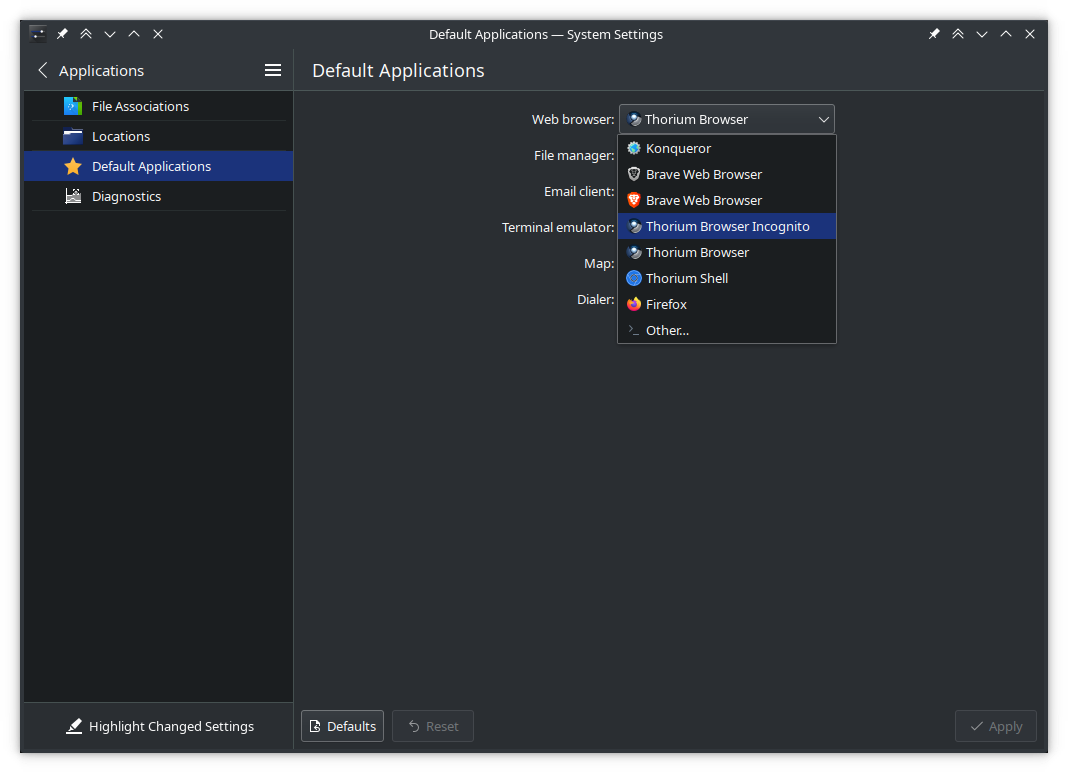
Finished for the day, I set the browser back to Thorium and restarted my system to clear a memory issue; something was slowly eating up memory.
After the reboot, I had a link in Sublime Text, right-clicked and chose to open it from the menu. (Link shown below for demonstration purposes only.)

Instead of opening in my default browser - Thorium - it opens in Brave. While Brave is installed, it is never set as default.
Under KDE System Settings -> Applications -> Default Applications the default was set to Thorium Browser. Checking at the terminal:
> xdg-settings get default-web-browser
thorium-browser.desktop
I set it to Thorium Browser Incognito. Opening my spreadsheet, I clicked a link and it opened in Thorium Browser Incognito. Trying the link in ST and it still opens in Brave.
Searching for solutions to this dilemma I found several links on this forum:
Sublime opens Chromium instead of System Default Browser - Technical Support - Sublime Forum
Open in Browser’ Keeps Trying to Open Parallels  - Technical Support - Sublime Forum
Html file doesn’t open in the defualt browser - Technical Support - Sublime Forum
Html file doesn’t open in the defualt browser - Technical Support - Sublime Forum
Default Browser will not open in Mac OS Sierra - Technical Support - Sublime Forum
The view in browser packages is not installed. While this was an issue at one time, it was 9 years ago and seemed to happen on Macs running Sierra.
Any help on what else to check would be appreciated.