Sublime Forum

Using a "full stop" ie '.' in a snippet

#1

Hi

An easy question, but can I find an answer ont web or here, niet.

In C++ this kind of code comes up alot:

.begin()
.end()
.push_back()

I’ve created the following snippet:
Unfortunately I can’t copy this snippet into this forum even with Preformatted text or quotes (Surely I’m making a mistake?). I’ll take a screen shot of it an pop it in…
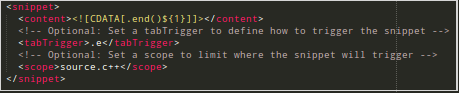
Screenshot

for .end() but it doesn’t work. It doesn’t even register in the list of possible completes, like all the other snippets.

It would be extremely handy to have this functionality. Could someone pop me in the right direction pls.

:computer: :woozy_face: :woman_juggling::call_me_hand:

0 Likes

#2

Make the trigger “end” and remove the . from the <content>, like this:

<snippet>
    <content<![CDATA[end()]]></content>
    <tabTrigger>end</tabTrigger>
    <scope>source.c++</scope>
</snippet>
1 Like

#3

Thanks for your reply
I’ve already got a lot of stuff that starts with an e, (for example).
It’d be good to discriminate those member functions (the one’s with a dot) so indeed I’ll use your solution if I can’t get what i want and i have to use that work around. Cheers.

I currently have no snippets that are ‘opened with’ “.e”, “.b”, “.p” so this would be really really handy.

Or is this an ST3 limitation ?

0 Likes

#4

I’m guessing as there’s been no reply, full-stops/periods can’t be used in snippets? Is this correct ?

Cheers

0 Likes

#5

Not sure how useful it is, but using <tabTrigger><![CDATA[.e]]></tabTrigger> works. However, it doesn’t work with the initial popup: you’d have to type . + e + esc + tab to get the snippet auto-completion to work or turn the popup off.

0 Likes

#6

Right. The limitation here is not the characters that are in the snippet, but the trigger/context in which autocomplete is activated.

As far as I know, OP could

  • write some Python to add end() etc. as completions only when the triggering character is .
    • See html_completions.py for an example that makes sure < is used to trigger known tag types.
  • manually invoke the AC popup with Ctrl+space
  • or use a snippet or completion definition without the leading .
0 Likes

#7

@srbs and @michaelblyons, Thanks to you both :+1:

0 Likes