
Problem description
Sublime Text offered to update new version, I accepted.
The updater downloded files and closed the application. It didn’t automatically restart the application. I restarted Sublime Text manually. The updater prompted me again to download a new version. I accepted. The updater closed ST again. ST didn’t restart automatically. I restarted manually. Error attached as screenshot was shown.
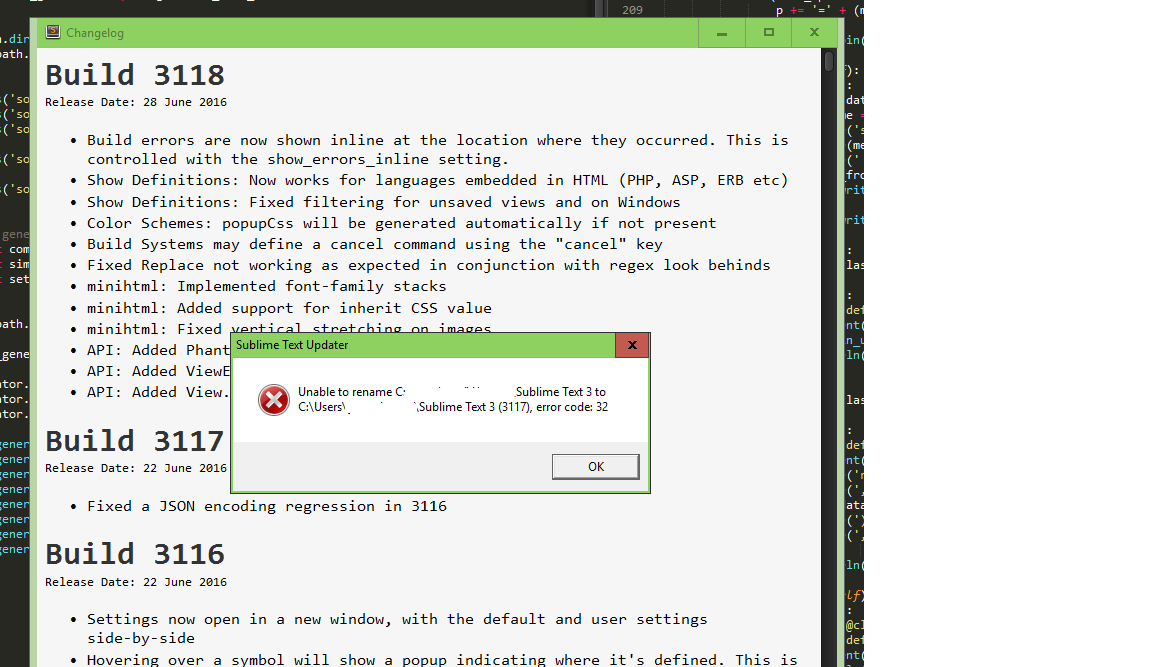
Note: A Windows system image was in the process of being created.
Expected behavior
Update process should complete successfully or maybe abort if an error is found.
Editor info (as provided by Sublime Text API)
General details about Sublime Text
Version and architecture
name: Sublime Text
version: 3118
architecture: x64
channel: dev
platform: windows
Package data
(Omitted.)
View settings
syntax: Packages/Python/Python.sublime-syntax
tab_size: 4
translate_tabs_to_spaces: True
encoding: Undefined
em width: 7.0
selection count: 1
has non empty selections: False
View state
is view dirty: False
is view readonly: False
Profiling data (as reported by Default/profile.py)
on_activated:
    Default.pane: 0.000s total, mean: 0.000s, max: 0.000s

on_deactivated:
    Default.history_list: 0.000s total, mean: 0.000s, max: 0.000s

on_modified:
    Default.settings: 0.007s total, mean: 0.000s, max: 0.001s
Platform info (as provided by wmic.exe)
Details about the current platform
Display information
OSArchitecture: 64-bit
Version: 10.0.10586
BuildNumber: 10586
BuildType: Multiprocessor Free
Caption: Microsoft Windows 10 Pro
FreePhysicalMemory: 10780780
FreeSpaceInPagingFiles: 2490368
FreeVirtualMemory: 12271752
Display information
PixelsPerXLogicalInch: 96
PixelsPerYLogicalInch: 96
This report was generated by the Troubleshooting package.