Sublime Forum

Unable to update Sublime Text

#1

Minor bug updating Sublime (just thought you guys should know)

I got this error:
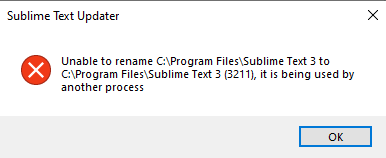
image

Then I got the prompt again:
[image|353x153] (upload://ffCqWw07twKZfqgWWLPxCYAWbJ2.png)

And followed the steps:
[image|401x140] (upload://qtUS6CxqwRv2F8KBxbo5LXBCWn9.png)

And got back to the start:
[image|390x158] (upload://f9haWR3VSrn8wgn7TuDGmwrNzEz.png)

Also, “new users can only post one image” is stupid… Limit file size, not number of images. My images combined take up less than 100kb, there is no reason to inconvenience your end user like this for a meaningless amount of server space. And 2 links in a post? Why all these stupid limits?

0 Likes

#2

Tried going to task manager to make sure that sublime_text.exe process isn’t alive ? if it is, Kill it and then try updating.

0 Likes

#3

Also, “new users can only post one image” is stupid… Limit file size, not number of images. My images combined take up less than 100kb, there is no reason to inconvenience your end user like this for a meaningless amount of server space. And 2 links in a post? Why all these stupid limits?

Our forums use discourse, I believe these are the default settings to combat spam.

0 Likes

#4

I don’t see that process even when Sublime is open oddly enough. Thanks for your reply

0 Likes

#5

I’m just saying the default settings are dumb, but if it’s not your call then I can’t blame you or ask that you change it I suppose.

Just very inconvenient and for seemingly no reason. It’s like judging carpool by the combined height of the passengers, or judging the price of a fruit based off of the density. That’s one way to do it, it’s just not a very intelligent or sensical way, and it’s frustrating to the user.

0 Likes