
Hi!
I am on a Windows 10 x64 machine with Sublime Text build 4200. Everything has been working perfectly for along time.
I have a package developed (duplicating a much-loved feature from my old editor Multi-Edit) that I want to submit and make part of the publicly-available package list, so I went through the steps on the Submitting a Package - Package Control page, but when I get to step 7 (Run the Tests), I
- installed the ChannelRepositoryTools package via Package Control, and
- ran the ChannelRepositoryTools: Test Default Channel command from the command palette,
but no matter what I do, I get this error message:
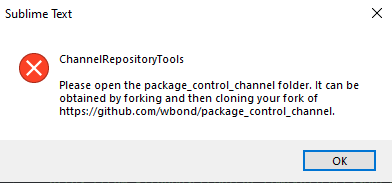
I tried:
- dragging the cloned fork of
package_control_channelrepository into the FOLDERS, - ensuring that folder was the only one open, and
- opening the project
package_control_channel.sublime-project, and ensuring thepackage_control_channelfolder was the only thing opened, - having the contained
respository.jsonfile the current file when I ran it, - having the contained
respository.jsonfile the current file when I ranChannelRepositoryTools: Test Local Repository (Current File) - repeating (4) with
channel.json, and - repating (5) with
channel.json,
but I still get the same error message in all cases.
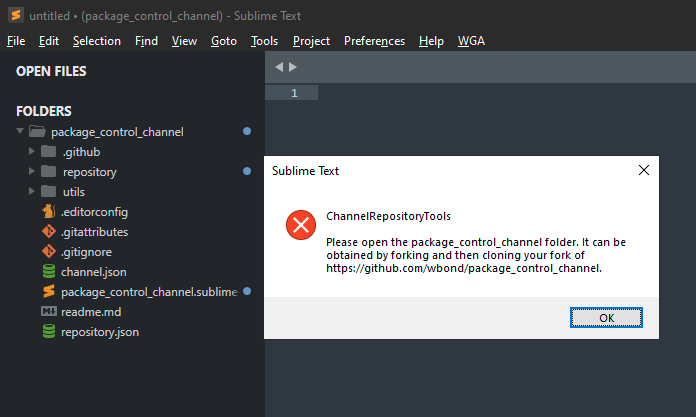
To show that I have the folder open from my locally-cloned fork:
So I tried debugging it by installing an override package folder Packages\ChannelRepositoryTools from the ChannelRepositoryTools package contents (validating that all files match the contents of https://github.com/wbond/ChannelRepositoryTools) and adding some print() statements in the execution path of the TestDefaultChannelCommand (clearly it is failing in the find_channel_folder() function), but no matter what I tried, when this override folder is in place, the Tools > Command Pallette... > ChannelRepositoryTools: list is now limited to ChannelRepositoryTools: Upgrade Repository Schema (Current File). The other commands do not appear!
Even if I remove the Sublime Text\Installed Packages\ChannelRepositoryTools.sublime-package file and re-start Sublime Text, the behavior remains the same. It is as though something internal to Sublime Text is suppressing the list of ChannelRepositoryTools: commands to just the one stated above. I even tried renaming the Default.sublime-commands to ChannelRepositoryTools.sublime-commands and re-starting Sublime Text, but nothing changes the behavior: as long as the override package folder Packages\ChannelRepositoryTools is present, all but one of the ChannelRepositoryTools: commands is suppressed, and when I remove it and instead run on the Sublime Text\Installed Packages\ChannelRepositoryTools.sublime-package file, all the commands are there, but they issue the above error message and I don’t seem to have a way to debug it.
I even tried putting the test_default_channel command in a test utility I have and binding it with a key. The results:
- if the
Sublime Text\Installed Packages\ChannelRepositoryTools.sublime-packagefile is in place, it runs the command and produces the same error message (shown above), and - if the override package folder
Packages\ChannelRepositoryToolsis in place, nothing happens.
Help!