Sublime Forum

Table of Key Bindings

#1

Hello!

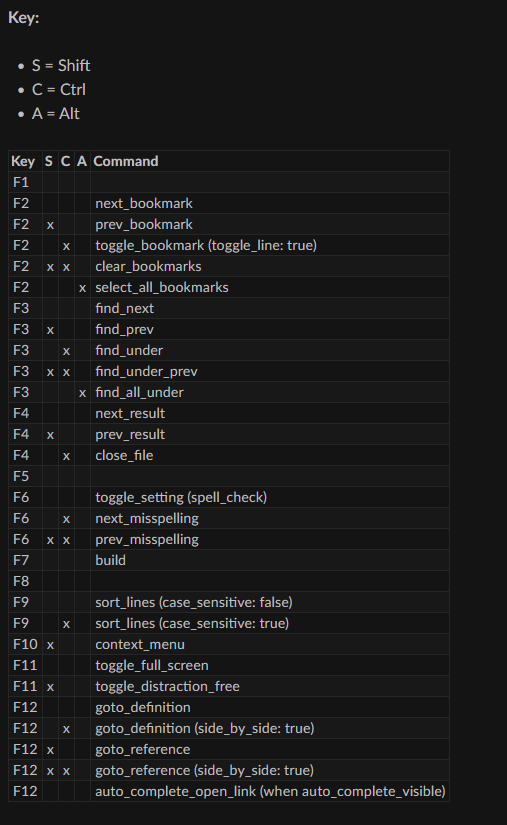
I have looked and looked and have not yet found a Sublime Text Package that can generate a table of existing key bindings, so I can look for “areas” of the keyboard that have not yet been used. Here is what I am looking for (I constructed this one by hand, from the Default (Windows).sublime-keymap that comes with Sublime Text build 4200).

If such a package is not available, I would like to write one to do this, as I would find it very useful for determining what key combinations are not yet used in my current Sublime Text run-time environment (and I presume others would too).

Towards that end, is there a way to programmatically access the current set of Key Bindings from within Sublime Text within a command? (I would like for a command to be able to see the current state of the key bindings that Sublime Text sees after all the applicable .sublime-keymap have been loaded, in the sequence they get loaded in.)

I have looked into the API and have not found any occurrences of the string “key” or “binding” that seem to apply to the live run-time key map, so I’m asking.

(Thanks to an earlier discussion about a similar topic, I’m aware that I can use sublime.find_resources('*.sublime-keymap'), followed by sublime.load_resource() and sublime.decode_value() to build that object myself in the same sequence as Sublime Text does. I was just wondering if it was already available somewhere.)

Kind regards,
Vic

2 Likes

#2

Try one or both of these:

They are both good plugins with slightly different feature sets.

0 Likes

#3

Hi, @gbird!

Thank you for your input. I had seen both of those before I posted the above question. The 2nd one is closest, and I will have a look at it, if only to learn from his code (and hopefully some internal documentation) about how the author approached getting the data.

Kind regards,
Vic

0 Likes

#4

Ping me if you got something. Esp. if you get something out of the binding contexts.

0 Likes

#5

Hi, @herr.kaste !

Do you mean if I develop a Package that produces a document like the screenshot I showed above? Or if I figure out how to access the run-time object? (My first thought was to generate that exact document [source is in reStructuredText] so that I could update my [full set of] default key maps I have here in the document I took the screenshot from. My idea was to regenerate it each time a new Sublime Text release occurs. But it is very readable even without generating HTML with it.)

At the moment, I think the right solution is to simply build the object in RAM by loading each keymap in the same sequence as Sublime loads the various Packages at start-up time. It would (to me) make sense to build it so that it was “fast accessible” by key combination (with contexts), so that it could be searched bottom-to-top just like Sublime Text does. So each possible key combination had its own (possibly empty) list.

Let me know so I know, if you will, so I know when to communicate. :slight_smile:

Kind regards,
Vic

0 Likes

#6

I’m interested in having that document like in your screenshot. As ASCII art not HTML so I can use normal scrolling and copy commands.

The UI trick is: how do you indicate and sort bindings contexts, and heavily overridden bindings.

Maybe bonus point, but may be simple to get right too, just render the keys actually active(?), literally bound to that view/cursor.

That’s indefinitely useful and allows for a lot of future ideas; mark conflicts with regions; allow disabling/commenting bindings; rewrite bindings. LOL.

0 Likes

#7

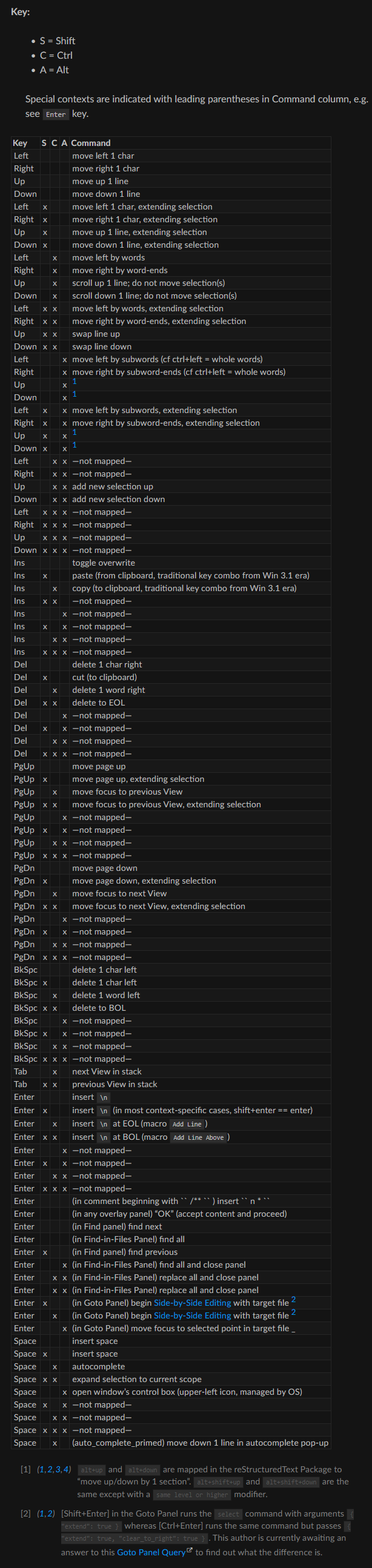
Agreed! That is the very reason(s) I started searching… because of that need. And I agree with the choice about which context to match: the context of the current caret in the current View. I expect I will start with ASCII output and then add a reStructuredText output option. At the moment, I did all the keys in the Default (Windows).sublime-keymap manually. Here is the document I took the above screenshot from. Where contexts played a large role were with the symbol keys, and in the Default Symbol-Key Bindings section, I put the English version of the contexts (translated by me and my eyes, so it’s possible there are some mistakes) in footnotes. It seems a very usable format to me, with the footnotes right underneath the table itself.

FYI, I haven’t done any kind of releasing of the above docs yet. In fact, you are the first person other than myself to see them. I was inspired to write that whole thing because in May 2025 I realized I was going to need a different editor (I had a beloved programmer’s editor that I had been using [and customizing] since it had a DOS version in 1992). And I found Sublime Text and fell in love (especially already being a Python programmer). And I went through MOST of the basic and intermediate learning curve with Sublime Text during the subsequent 30 days and wrote most of what you are seeing in that time period, but I have been updating it every time I learn something new. I find I use this documentation more frequently than I do the community or official docs.

The biggest reason I started writing it was I was finding a lot of information I needed about Sublime Text (e.g. the orientation on the Introduction page, the official names of things on the UI, the run-time object model, etc. etc. etc.), but was not able to find it in either official or community-based docs. And I was otherwise earning my income writing in reStructuredText (finding it enormously superior to any other doc format I had yet encountered). So at the top-right of each page, there is a link to view the plaintext ASCII file that was used as source to generate the HTML. I find the source very readable – way better than .md files in my opinion (easier to read, and so very capable and modular).

An example of missing documentation: the API is extreeeeemely under-documented—there is know-how related to that API that should be in a book somewhere, for people who would otherwise be using Sublime Text, but cannot figure out fast enough how to customize it, so they go to another solution. Such a book would create an ENORMOUS demand for Sublime Text in my opinion. Yes, I’m aware of Terence Martin’s extremely valuable (and thorough!) contribution in the way of YouTube videos—these were a “lifesaver” for me, but they do take an enormous of time investment to learn stuff, whereas sometimes I would like to go directly to the chapter and section I am looking for, or even dive directly into example code that does what I am trying to do, complete with internal code documentation that describes the “whys” and “wherefores”. (The example code, of course, is one of the blessings of having the large Package library to go to, but it’s not always well documented internally.)

The Package I’m working on right now (and getting close to release on), lends towards making such in-code documentation easier to produce.

I’ll be in touch! :slight_smile:

Kind regards,
Vic

P.S. Please forgive the “Build Systems” page. It’s as yet incomplete and is a work in progress, as are several of the pages.

0 Likes

#8

Also, in the back of my mind, is the fact that the [F1] key is not mapped at all, and the book I mentioned above should pop up on demand in a context-sensitive way and I know how to do that… At least for Windows.

0 Likes

#9

OMG, you’re writing a book. I just thought you make a “simple” Sublime view with a structured listing of the bound keymaps. That’s huge.

0 Likes

#10

I am probably a hallucination from my misspent youth, but I thought when I first started using Sublime, it would do that and give you a nice report of all the key-codes.

0 Likes

#11

Actually, I’m not writing a book… Rather, I’m saying that a book needs to be written (or something that provides an easy-to-use technical reference) about all the nuances about using the API – that are not explained by the API documentation itself.

If things keep going the way they are going, that “knowledge” will end up in the HTML pages referenced above, since “every time I learn something new about Sublime Text, I’m adding it”. So, I suppose the reference I have been building (for myself up to this point) might end up BEING that book… We will see…

Historically, VERY SUCCESSFUL SOFTWARE always has high-quality, easy-to-use, complete documentation. Reason: end users need to learn how to use it the way it was intended to be used. And the ease with which that can happen is governed exclusively by its documentation. So my initial hopes were to get my work combined into the Official Docs, but I don’t know who to talk to or what the actual situation is about why it is so incomplete. :frowning:

And honestly, I do not like it when I want to learn everything about 1 topic that I have to go to 4 places to learn it:

  1. Official Docs
  2. Community Docs Guide
  3. Community Docs Reference
  4. YouTube (thank you Terence for filling in the gaps!!!)

Sadly, all that requires a large time investment. In my opinion, it should ALL be in 1 place, where a reader (like me) can go directly to what he is looking for, study it (and practice) end to end, and be an expert at it.

If we had that, the market for Sublime Text would skyrocket in my opinion.

Let me say that another way: if we had such documentation, a lot MORE people would prefer Sublime Text to VSCode. I think the lack of it is a factor in driving people to use VSCode.

If the “owner(s)” of Sublime Text asked to hire me to make that happen, I would say, “Yes!!” I’m well qualified to do so.

Kind regards,
Vic

cc: @OdatNurd
cc: @FichteFoll

(It seems this topic probably should be in its own thread.)

0 Likes

#12

It certainly would make sense for something like that to be built in… I started using Sublime Text in May 2025, so I have no direct knowledge of the earlier versions.

0 Likes

#13

I note the word “Windows” but I largely use Ubuntu these days. Although I can dual boot into Windows. Now I am engaged in using Subl as my “Houston centre” for many escapades. It is my one stop shop to call many assets from a Subl page. Now to answer your issue I recommend that you install Recoll. The Windows version will cost you but the author (who offers it free on Linux) argues that it takes some extra effort to support the Windows clan. Once installed run a full index of your desktop (first time across desktop it will take a while or you can narrow down index to say Subl assets). Then I ran the query … sublime-keymap … and up pops loads of hits. So my advice is make up some cheatsheet of custom queries and just run either in gui or via command line. I could add how to get into Sublime with three keys wherever you are but I haven’t tested it in Windows. Subl Text is my one stop shop for anything I want to access. Ubuntu users - install Albert and enable Albert Snippets.This takes you into the heartland. I use this as my launchpad into desktop and cloud assets. Including Claude.

Further tip with Recoll. Hover cursor over query field to see cheatsheet of search operators.

0 Likes

#14

Hi, @Innovator ! Thank you for the tip! Brilliant idea! And given the “fallback” (a.k.a. insurance) of Proton to be able to run Windows apps (in an emergency), combined with Microsoft’s egregious “move” to tell me my hardware is “out of date”, add surveillance that you can’t turn off, not to mention treating my computer as if it was theirs… I’m expecting I will be using some flavor of Ubuntu as well soon (Mint or Fedora, but that’s yet to be determined). Back in the early '90s I was a Unix system administrator, so I still remember over 70 command-line utilities pretty much by (finger) muscle memory.

For the record, I too now consider Sublime my “one-stop shop”. Sublime just gets SO MANY things right (like how Projects work). Your description reminds me of the Emacs users I have been exposed to, who do everything from inside Emacs. Before May 2025 I was still using a wonderful programmer’s editor I had been using since 1992, that had some important features that Sublime Text doesn’t have out of the box. The big sales point for me was whether it would allow me (within a reasonable learning curve) to add those features I needed and wanted from that prior editor, and so far I have been able to do so successfully as I can carve out time to do so. Line Drawing is next: ASCII “lines” first, and then possibly Unicode lines… possibly.

0 Likes

#15

I will expand further here on more advanced workflows with Subl Text and CherryTree teamed. I am a bit busy. Meanwhile if you want line drawing (I prefer SVG) test mermaid.ai … sandbox. And you might explore Claudette plugin which can (in my case) load drawings requests into CherryTree and download cargo … what I dub the AI Shuttle Protocol. CherryTree (Snippet) posted to Claude from Subl Text launch pad and returned to earth. Thanks SpaceX for the idea. Although decades ago I was an apprentice on the Flying Bedstead (Rolls Royce). Look it up.

0 Likes

#16

WOW! How cool! I can see why they used the term “bedstead” – the wheels.

Re CherryTree: it reminds me of an old favorite of mine: Brackets (allowed building of Warnier-Orr diagrams, great for complex algorithm development, with some rudimentary code generation that never quite matured). Sadly, its author got hired by IBM and as a consequence, he had to stop developing it as part of his hiring agreement. But I regularly wish for a mature multi-platform version of it.

Re Claudette: impressive!!

1 Like