
I have Sublime on MacBook and windows PC. When first installed it worked like it was supposed to.
All at once it won’t run my files. For instance bring up a file to run and it asks for input enter the input
hit enter cursor drops below and stops nothing else. Mac and PC both doing this. What gives?
thanks
Paul
Sublime won't run python files
paul11
#1
0 Likes
gbird
#2
There is not a lot to go on here. Have you recently upgraded ST? Is it possible that your codebase relies on older Python libraries that are no longer supported? Are there any error messages in your console?
0 Likes
paul11
#3
Thanks a million for replying
No error messages. just cursor drops below the menu where the next request should be. nothing else.
This is on windows and MacBook. They worked perfect when first installed. The files in question
runs perfect in Pycharm and VS Code. I have uninstalled and reinstalled on the Mac with no help.
Any other info I can provide will be glad to.
God Bless
Paul11
0 Likes
paul11
#5
Thanks for reply. Does not work in safe mode. I click the file menu select open. go to where file is at
select it it opens in the program. press command + B the program runs the menu comes up
I select a menu option hit enter and the curser drops and no further like that’s all folks. Windows PC
does the same thing…
0 Likes
paul11
#7
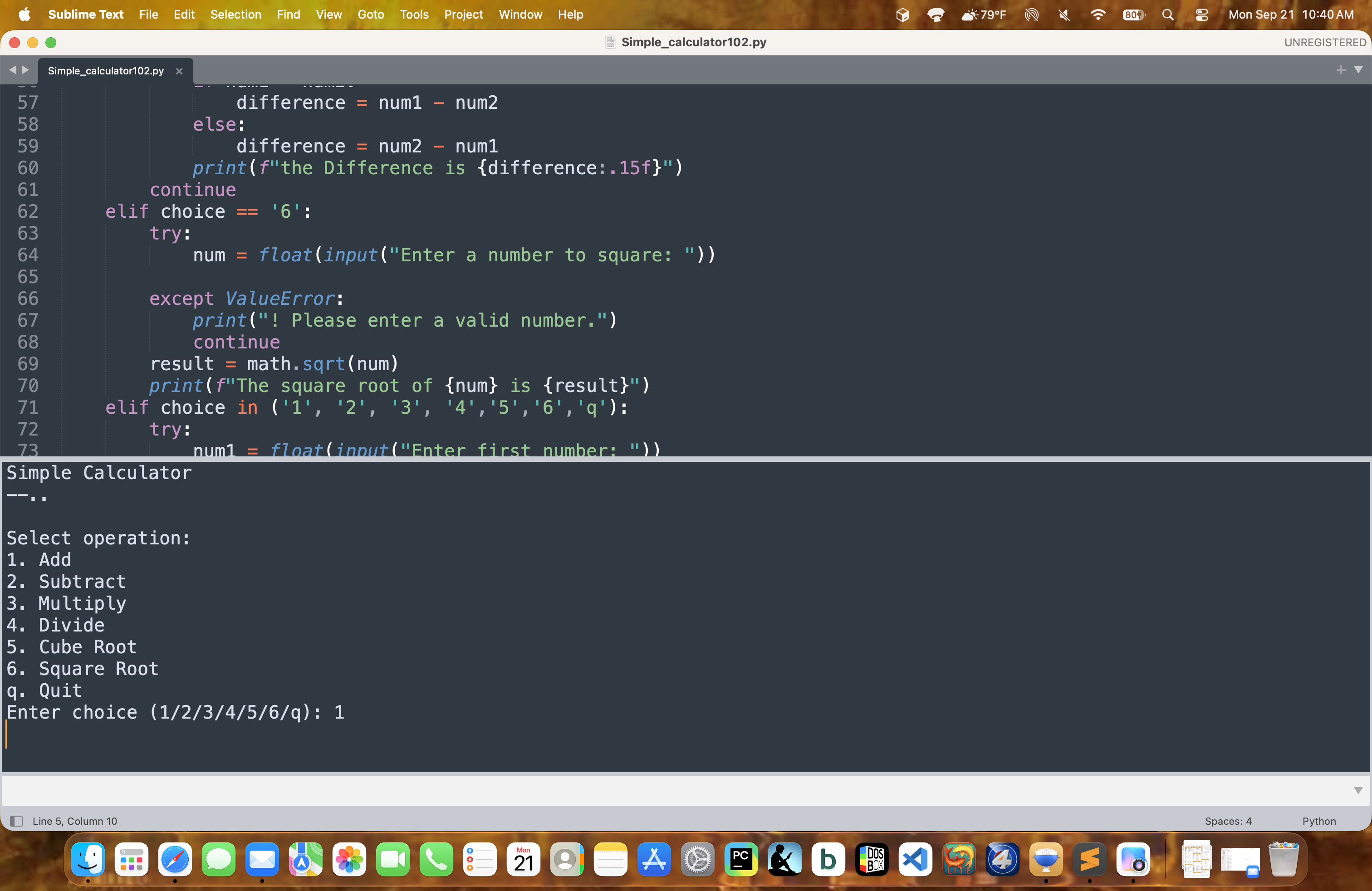
Yes I can but this is not a sublime menu it is the menu I have written into the script…for example my calculator programs menu. it asks for 1 to add 2 to subtract ect. the I enter the number for what I want
it to do and hit enter its done no further action. Runs perfect in pycharm and vs code
0 Likes
bschaaf
#9
It looks like you’re typing into the output panel. Input needs to into the input panel below that - the white box underneath the output.
0 Likes
paul11
#10
You are exactly right. I just found out. I could not see it. for some reason I scrolled and
there it was. I feel like a 100% idiot. I have been working on and building computers
since 1985 and I let something this simple get by me. Thanks for your help.
God Bless
Paul
1 Like