Sublime Forum

Sublime Text 3 crashes on strange Unicode (3114, on Windows)

#1

Hi there,

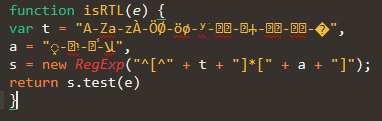
The latest version (3114) crashes consistently when having to render these lines:

function isRTL(e) {
var t = “A-Za-zÀ-ÖØ-öø-ʸ̀-֐ࠀ-῿Ⰰ-﬜﷾-﹯﻽-�”,
a = “֑-߿יִ-﷽ﹰ-ﻼ”,
s = new RegExp("^[^" + t + “]*[” + a + “]”);
return s.test(e)
}

These are actual lines of code from a Chrome plugin (https://chrome.google.com/webstore/detail/facebook-chat-downloader/kflkdhmijdgjnlbdkfgdmolcjnflmlhf)

Can I do anything to fix it or is this a serious bug?

0 Likes

#2

Works for me on build 3113 on Windows 7x64 - does disabling all your plugins make any difference?

0 Likes

#3

I have no plugins installed. This is a fresh install of the latest version. Have you tried 3114 instead of 3113? Also I’m on Windows 10 x64.

I’m pretty sure the Unicode is being copied right. Copying and pasting from the post makes it crash.

0 Likes

#4

3113 and 3114 are exactly the same, just one is on the Beta channel and one is on the Dev channel. But I guess it’s worth a try anyway :wink:

Does it make a difference what syntax highlighting you have selected? i.e. does it still crash in Plain Text mode? in my testing, I pasted it into a new tab, then tried changing to various syntaxes and it worked fine.

0 Likes

#5

Works for me as well. Windows 7 x64.

0 Likes

#6

No problems on Windows 10 x64 ST 3113.

0 Likes

#7

Try a different font, maybe?

Works fine here (Windows 8.1, x64), using Source Code Pro font.

0 Likes