Sublime Forum

Sublime Text 3 Build 3047 vs Sublime Text 2 cleartype

#1

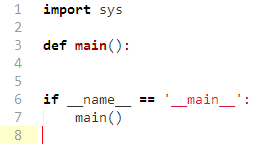
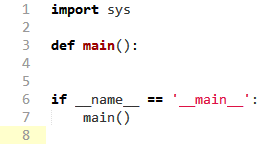
I installed both Sublime Text 2 and 3 under Windows with directwrite enabled, and version 2 seems to apply a bolder “version” of the cleartype tuner settings.

It’s really subtle and impossible to notice if you use a color scheme with a dark background.

If i set the cleartype tuner with the lightest and thinnest possible settings (or looking text) both versions look the same, but if i set everything to look very bold, version 3 looks less bold.

Is that the expected behaviour?

Note: I have no plugins installed. Just a clean install in both cases, with the same preferences (directwrite, font face and font size).
0 Likes

#2

What DPI scale is being used? Sublime Text 3 reports this in the console, it should be the very first line

0 Likes

#3

I believe I have this problem too. I registered to post about it, but someone already did that.

After updating to latest version of 3.x series from stable channel (3047), this issue appears and it doesn’t change regardless rendering used (gdi or directwrite)

Here is screenshot from previous version:

and here is with latest version:

I would prefer former way of rendering, at least as custom setting if possible.

Thanks

PS. First screenshot is from ST2, as I don’t have previous build of ST3, but it seems like subpixel rendering is too strong for latest Windows version of ST3

0 Likes

#4

The DPI scale is 1 in my case.

[quote]DPI scale: 1
startup, version: 3047 windows x64 channel: stable[/quote]

0 Likes