Sublime Forum

Sublime GUI blown up

#1

Hi,

I’ve been having this problem the last few days where my whole GUI for Sublime Text is blown up to be huge, I’ll post a picture below to show what it looks like. (font at the smallest in image)
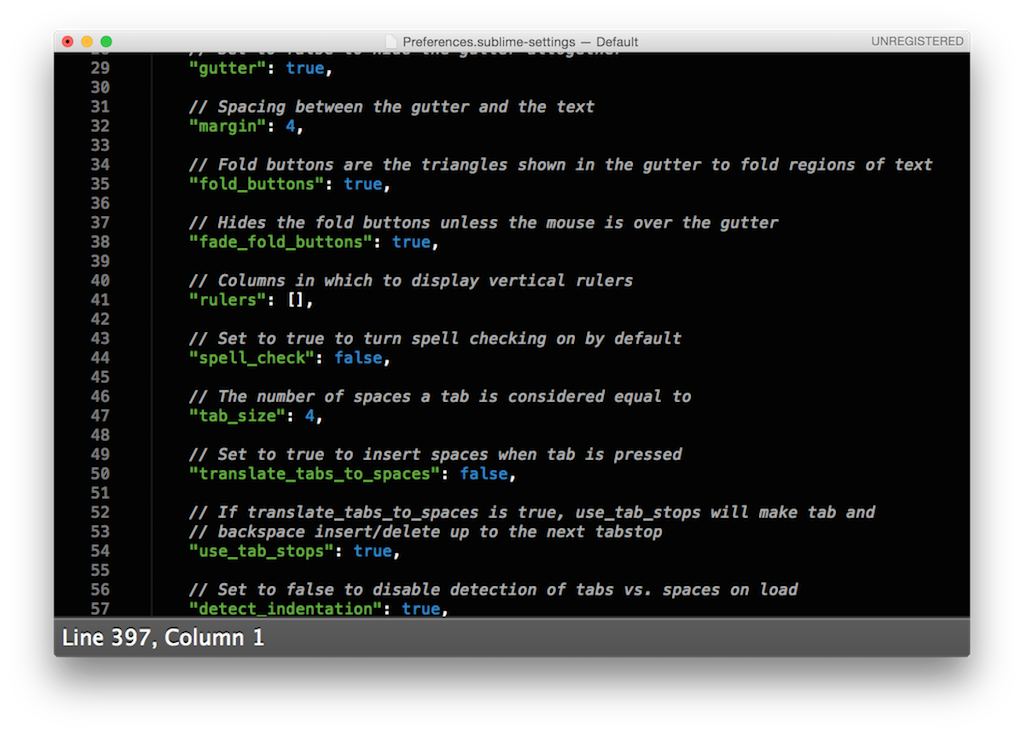
The bar at the bottom (Line ##, Column ##) is the most obvious part that’s larger than it should be.
Trackpad/mouse clicks are visible in the code sometimes but they are at a constant offset from where the mouse is on-screen.
Also the mini-map on the right hand side is missing, and when scrolling right to the top there is a large chunk at the top that cannot be scrolled to (so the application must think it’s smaller than it is?)

This behaviour can only be seen on my MacBook Pro 10.10.2 (Yosemite) with Sublime, not with any other application.

Thanks in advance if anyone knows how to fix this, it’s making my life very difficult as you may imagine.

Maxx

0 Likes

#2

I’m having this exact same problem. Starting happening yesterday on my registered version of Sublime Text. Tried both the latest 2 and 3 beta builds and have the same issue. On a MacBook Pro (Retina, 15-inch, Late 2013) with Intel Iris Pro and OS X 10.10.2.
Sublime Text is the only tool I use to make Corona apps and this problem is driving me nuts! I’ve tried complete uninstall, removing the Library->Application Support->Sublime Text folders, restarting etc. and no luck at all.
Here is an image of Sublime Text alongside Outlaw (that I’m having to use as a backup until this gets fixed) as a window and text size comparison on my MBP. The file is Preferences.sublime-settings scrolled as far up to the top of the file as Sublime Text will allow.

http://i14t.com/sublime_text_issue.jpg

0 Likes

#3

This is a bug with OS X 10.10.2. It affects other programs like Spotify.

More info at github.com/SublimeTextIssues/Core/issues/580.

0 Likes