Sublime Forum

Sublime build 3176 on Mac cannot create Project or Workspace

#1

Just downloaded build 3176 for Mac; I’m running MacOS 10.13.5 (17F77)

Created a folder apt-s3 and some files in my ~ (home) directory (using git clone), sidebar appears in Sublime and shows folder tree ~/apt-s3 \o/

Then tried to create a project, Project => Save Project As…: Unable to write workspace /apt-s3.sublime-workspace

Guessed that maybe I need first to create a WS, so tried Project => Save Workspace As…: Unable to write workspace /apt-s3.sublime-workspace

Hmm … maybe Project => New Workspace for Project? => nope, Unable to read project /apt-s3.sublime-project

None of this is covered in http://docs.sublimetext.info/en/latest/file_management/projects.html#workspaces, that I could see, and similar topics are years old …

So, how is it actually done? Or is build 3176 bad? or …?
0 Likes

#2

The filename /apt-s3.sublime-workspace is using the path /, which is not something that non-administrative users have access to modify (and even if you do, it’s not a good idea to put files there).

It sounds like you accidentally selected the root of the file system (possibly named Macintosh HD) instead of the folder in your home directory or the home directory itself, depending on where you want to store your project.

0 Likes

#3

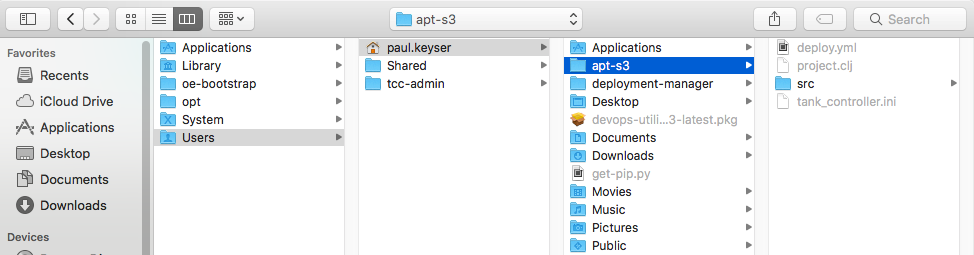
Er, not sure where I would have selected anything. When I added the folder, using “Add Folder to Project”, I navigated to it in the file-dialog that popped up:

Besides that, no selection at all anywhere.

If that’s not how to specify a folder, what is the correct way? Or are you saying that the direct parent of the project-folder cannot be my home directory?

thanks,
Paul

0 Likes

#4

When you do Project > Save Project As, that’s where you’re asked to select the location to store the project in; the same is true for Project > Save Workspace As.

There’s no restrictions imposed by Sublime on where the project is stored in relation to the folders that are in the project. Some people keep the projects inside the added project folder while others have a folder set aside that stored just their projects.

Both of the above operations are different and distinct from selecting the folder(s) to add to the project. Possibly when the dialog opened the default location it was showing was your home directory and not the folder that you had open at the time, in which case if you went up a folder to try and save the project in the parent folder you accidentally went up to the root of the file system instead.

0 Likes

#5

D’oh: yes, there is a little dialog that appears when I first try to “save project”, I just didn’t read it carefully enough and accepted the default. As you said, that default is Macintosh HD. If instead, I navigate downward in that little dialog, and put the project file in a directory adjacent to the folder of code, then it works.

Sorry for the confusion!

thanks

0 Likes