Sublime Forum

Status text and replace text not showing

#1

Hi,

I’ve encountered a bug where text on status bar and replace button texts are not showing. I’ve got package control installed and whenever I open package control or install packages, the status bar appears blank. The operations occur but no status text is shown. Similarly, there is no text on the status bar indicating which programming language is selected.

The text on replace buttons also appear to be missing. Pressing Ctrl+H, I get the replace dialog but no text on the buttons that should have ‘find’, ‘replace’, ‘replace all’, type text.

In terms of packages, I only have Emmet and El Capitan Theme installed.
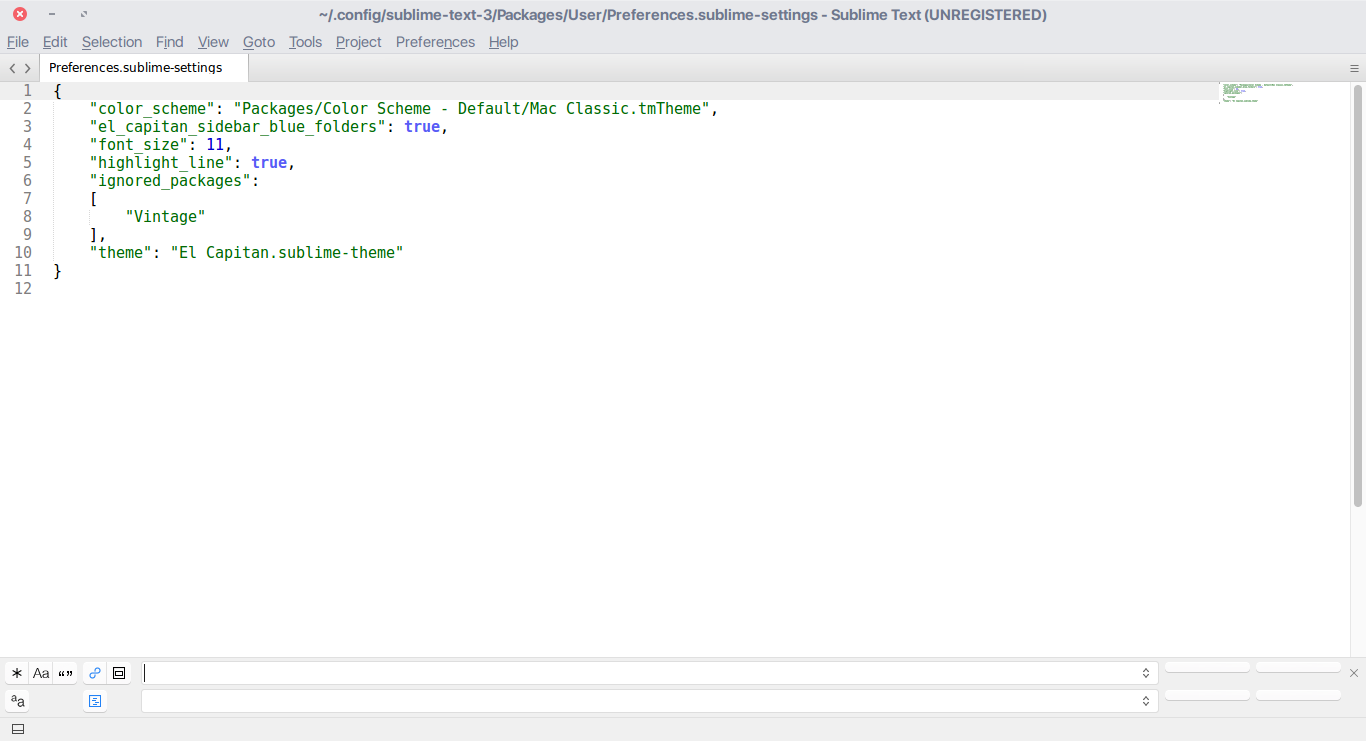
The attached image shows the problem and my user preferences.

What kind of bug is this, and how can I fix it?

Thanks for the help.

0 Likes

#2

From your screenshot, I assume you are using 3103. There was an issue with a long status bar not rendering any text if it exceeded the window which has been fixed in a dev build and will get shipped to beta later. It could be a different issue, however.

The button text seems odd to me but I guess this is caused by the theme you are using. Please try a different one (such as the default).

0 Likes

#3

Yes, the build is 3103.
Reverting the theme did bring back the text in the replace buttons.
I guess it was a bug in the theme. But I also tested the theme in Windows, and there was no problem there.

I guess I’ll have to wait for a new beta to fix the status bar problem.

0 Likes