
I got the (surprise) update from ST3 to ST4 and can no longer right-click on a folder in the side pane and use “search in folder” as it’s greyed out. As well, in pl/sql, when hovering over a function name, clicking on the function name no longer takes me to the definition. Is this intentional crippling of an unregistered version of Sublime Text 4 or are these bugs?
ST4 - Some features no longer working after upgrade
OdatNurd
#2
Nothing is crippled; the entirety of the changes for “License Update Required” are text in your title bar and (if you enter an older license into it) a one time dialog telling you that you need an update.
If things aren’t working as they used to, the most likely culprits tend to be overrides masking base functionality.
The first thing to test is using Safe Mode to see if you can reproduce your issues there.
0 Likes
Trev
#3
Okay, safe mode brings back “search in folder”, but I can’t test “go to definition” in pl/sql as that’s supplied by a package https://github.com/TheEggi/Advanced-PLSQL
Edit: I tried a JS file and there is the same issue, there is a popup with the link to the function definition but clicking on it does nothing.
What’s the process for troubleshooting my issues here?
0 Likes
bschaaf
#4
If you go to Preferences > Browser Packages… do you see a folder called Default in there? If so you’ve got an override for the default package which can easily break things when updating - either update your patches or remove them.
0 Likes
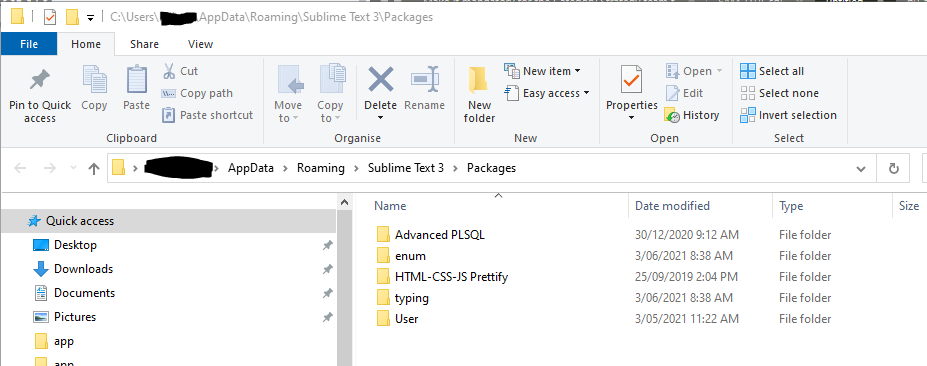
bschaaf
#6
Also check for Default in the parent directory and then Installed Packages (../Installed Packages). If there isn’t one I suggest adding your installed packages to the "ignored_packages" setting to find the culprit.
0 Likes