Sublime Forum

ST3 theme not working in ST4

#1

Hey I was wondering if there’s some automagical conversion tool to update themes.

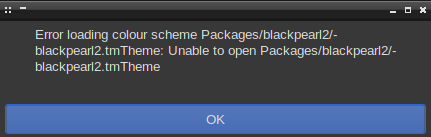
It’s a bit weird, when I open ST4, I get an error, complaining about the theme, but if I just throw the theme into “Installed Packages” when ST4 is already running, it parses fine and I can use the theme, until the next time I open ST4, get the error and ST4 for some reason decided to delete the theme from the “Installed Packages” directory
0 Likes

#2

ST3 themes should keep working. Kind info icons might not look optimal due to extra spacing in completions or Goto Symbol panels and the “panel icon” in the lower left corner was changed, but they should work otherwise.

Any details about error messages?

0 Likes

#3

image

ok, I just tried using the ~/.cache/… directories instead as that’s where somethings live now, I was using a zip archive before but it might have been broken/corrupt

you can mark this resolved

0 Likes

#4

You shouldn’t have to put things into the Cache folder, and in fact that’s not a good idea because it’s essentially temporary storage for things that can be easily recreated and it may get flushed without your realizing it, in which case your file would be lost.

tmTheme files are actually color scheme files despite the unfortunate name (inherited from TextMate).

Without seeing the files on your system it’s hard to say what might be going wrong there, but something to note is that the color scheme that’s in use for a file is remembered at shutdown and restarted at startup, so if the color scheme is missing Sublime will keep complaining. If the file changed locations or names you can close the files that are trying to use it and re-open them to get Sublime to look again.

0 Likes