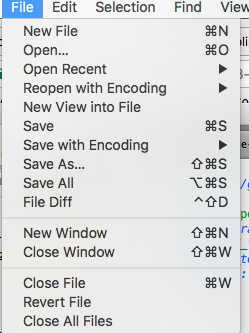
I want to add the file_diff_menu command to the main menu of ST3 on OS X.
I found the main.sublime-menu in Default.sublime-package in /Applications/Sublime Text.app/Contents/MacOS/Packages
However when I unzip and extract main.sublime-menu to ~/Library/Application Support/Sublime Text 3/Packages/User and start ST3 it shows ALL the menus are duplicated.
I already read http://docs.sublimetext.info/en/latest/customization/menus.html#menu-types
My question is do I have to repackage the Main.sub-menu is there an override?