
Whenever I save python files my tab settings are overridden and the tabs change from spaces to tabs.
Here’s what I’ve tried: with a python file file open, I open Preferences > Settings > Syntax Specific. In the Python.sublime-settings file that’s opened, I have these settings:
{
    "tab_size": 4,
    "translate_tabs_to_spaces": true,
    "detect_indentation": false
}
When I open python files, the tabs are tabs.

I change them to spaces using the convert to spaces option, and can see them change in the editor
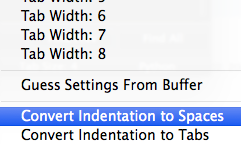

But on saving they change back to tabs.
How can I resolve this? Is it an error with Sublime? Or are there other settings to change?