
Hey there-
I’m new to Sublime, coming from TextPad (which I had used for AGES), and I’m still trying to find my way around a couple minor hitches. I see this has been discussed more than a few times on the forum already, but for all of its advantages, Sublime seems to be severely lacking in the sorting department.
TextPad had wonderfully advanced sorting options, as evidenced here:
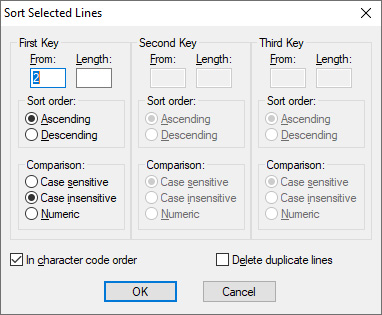
So if I had a list like this, for example:
4x navy beans
2x alfalfa sprouts
3x black beans
1x kidney beans
8x black-eyed peas
3x broad beans
6x green beans
1x bean sprouts
2x lentils
1x peas
I could just change the First Key to be 2, so that the items could be sorted by their name, as opposed to their quantity, like so:
2x alfalfa sprouts
1x bean sprouts
3x black beans
8x black-eyed peas
3x broad beans
6x green beans
1x kidney beans
2x lentils
4x navy beans
1x peas
I don’t suppose anyone has managed to find/write a script that does something similar in Sublime? I actually use this function quite often in my job; except I’d replace the list of legumes with names of bands & records, of course…  Thanks!
Chris