Sublime Forum

[Solved] How to remove the Project Menu?

#1

How to remove the Project Menu?
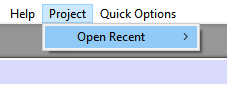
Even If I delete all the default Main.sublime-menu file context some menus keep showing up as on the above image.
How can I remove specifically the Project menu?

I searched on the default files, and I did not found any other file defining its menu entry.

0 Likes

#2

You would need to override Main.sublime-menu from the Default package; that’s where it is being initially added to the menu.

Standard warnings apply w/regards to overriding a file such as this; your override will mask any official changes made to the file on future Sublime releases, etc.

3 Likes

#3

I already did it.

This is my Main.sublime-menu file on the Default.sublime-package:

[

]

I just remembered, I had a third part package adding more open recent menus’ entries, so I delete it and it is gone.

0 Likes