Sublime Forum

Snippets not appearing at the top ST4

#1

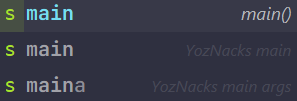
Since I’ve upgraded to sublime text 4, when I type the code completion of my snippet that sublime also uses (say main in c), the completion of sublime is always at the top, while my snippet is at the bottom.

How can I put the snippet at the top.

For example, in the following image, the YozNacks mains should be on the top.
image

0 Likes

#2

Do you even need the built-in main? I feel you are trying to create an override?

0 Likes

#3

This here is the only thing holding me back from ST4, after selecting a snippet once, all future instances should then default to the snippet, I tried auto_complete_use_history in ST4 but it doesn’t work as intended.

0 Likes

#4

That’s what I’m trying yes

0 Likes

#5

Since you are using ST 4, you may use

    "ignored_snippets": [
        "C++/Snippets/*",
    ],

in your settings to ignore all C/C++ snippets. If that’s way too aggressive, you can just ignore those you don’t want to use. Like

    "ignored_snippets": [
        "C++/Snippets/main()-(main).sublime-snippet",
        // more...
    ],

Another way that is you use the same path with the official directory structure so it will override the official one. For example, creating Packages/C++/Snippets/main()-(main).sublime-snippet and writing your own main() in it.


But it eventually seems like a auto_complete_use_history bug in ST.

1 Like