Sublime Forum

Save Operation Failed Error

#1

Using Sublime Text Version 3.2.2, Build 3211.

When I open Sublime Text and try to save a new file in folder - it hangs for a while and gives the following error. I tried restarting the Sublime editor and I see the same error.
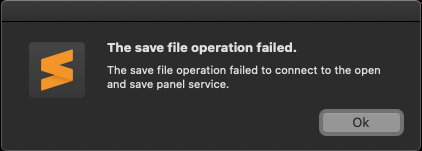
42%20AM

I see the below log in Console app in Mac.

default	07:36:50.513844+0530	Sublime Text	-[NSSavePanel beginServicePanel]_block_invoke : Could not advance an Open/Save panel to run phase due to error: Error Domain=com.apple.ViewBridge Code=16 "(null)" UserInfo={com.apple.ViewBridge.error.hint=advance to run phase, com.apple.ViewBridge.error.description=NSViewBridgeInvalidError}

default	07:36:50.515253+0530	Sublime Text	-[NSSavePanel beginServicePanel] : an exception occurred during attempt to advance an Open/Save panel to run phase!

default	07:36:50.521325+0530	Sublime Text	-[NSSavePanel runModal] caught non-fatal NSObjectNotAvailableException 'The operation couldn’t be completed. (com.apple.ViewBridge error 16.)' with user dictionary {
    error = "Error Domain=com.apple.ViewBridge Code=16 \"(null)\" UserInfo={com.apple.ViewBridge.error.hint=advance to run phase, com.apple.ViewBridge.error.description=NSViewBridgeInvalidError}";
} and backtrace (
	0   CoreFoundation                      0x00007fff3938a8ab __exceptionPreprocess + 250
	1   libobjc.A.dylib                     0x00007fff6f644805 objc_exception_throw + 48
	2   AppKit                              0x00007fff36eca398 -[NSSavePanel beginServicePanel] + 801
	3   AppKit                              0x00007fff36ecab83 -[NSSavePanel runModal] + 98
	4   Sublime Text                        0x000000010b4e8e08 _Z19px_show_save_dialogP11px_window_tRKNSt3__16vectorINS1_4pairI9substringNS2_IS4_NS1_9allocatorIS4_EEEEEENS5_IS8_EEEES4_S4_S4_PNS1_12basic_stringIcNS1_11char_traitsIcEENS5_IcEEEE + 1076
	5   Sublime Text
0 Likes

#2

I am using MacOS Catalina
System Version: macOS 10.15.3 (19D76)

0 Likes

#3

You probably want to mention which version of macOS you’re running.

0 Likes

#4

I am using MacOS Catalina
System Version: macOS 10.15.3 (19D76)

0 Likes

#5

Did some trial and error, narrowed down to this:

  1. I am able to create a new file from Side Bar right click a folder and New File.
  2. The error occurs when I create a new file with the following html snippet (see below) and press Save CMD+S. If I delete the contents in the unsaved file and try to save empty, same error occurs.
  3. If I create a new file with random initial content say ‘zdfaf’ and try to save, then hit cancel and replace the random string with the following html snippet no error occurs. Save operation successful.
<main class="auth">
  <header id="auth-header" class="auth-header" style="background-image: url(/images/illustration/img-1.png);">
    <h1>
      <img src="/images/brand-inverse.png" alt="" height="72">
      <span class="sr-only">Sign In</span>
    </h1>
    <!--<p> Don't have a account?
      <a href="<%= Routes.authentication_path(@conn, :index) %>">Create One</a>
    </p>-->
  </header>
  <!-- form -->
  <form class="auth-form">
    <div class="text-center mb-4">
      <div class="mb-4">
        <h1 class="h3"> Sign In </h1>
      </div>
    </div>
     <div class="form-group">
      <a class="btn btn-lg btn-success btn-block active" href="/auth/identity"><i class="far fa-envelope"></i>
&nbsp; &nbsp;Email</a>
    </div>
     <div class="form-group">
      <a class="btn btn-lg btn-danger btn-block active" href="/auth/google"> <i class="fab fa-google"></i>
&nbsp; &nbsp;Google  </a>
    </div>
     <div class="form-group">
      <a class="btn btn-lg btn-primary btn-block active" href="/auth/facebook"><i class="fab fa-facebook-f"></i>
&nbsp; &nbsp;Facebook</a>
    </div>
  </form>
  <!-- /.auth-form -->


  <!-- copyright -->
  <footer class="auth-footer"> © 2018 All Rights Reserved.
    <a href="#">Privacy</a> and
    <a href="#">Terms</a>
  </footer>
</main>
<!-- /.auth -->
0 Likes

#6

For replicating the above scenario:

  1. Install package from https://packagecontrol.io/packages/Elixir .
  2. Save the html snippet in previous comment should be saved in a file with extension - index.html.eex
  3. Open the file and copy contents from index.html.eex in sublime editor.
  4. Create new file with initial content by pasting previously copied content from index.html.eex and try to save the file, error occurs.
0 Likes

#7

Could anyone reproduce this bug?

0 Likes