Sublime Forum

"Save as type" is ridiculously wide (horizontal) not tall (vertical)

#1

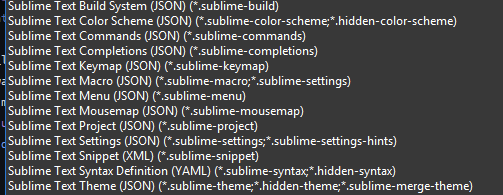
I have been struggling to even describe this issue properly in a way that shows me anything even resembling the problem I’m actually having.

So. Can anyone here give me ANY insight on to what to do about this EXTREMELY LONG list of file types that stretch out my dropdown menu across two monitors, only in Sublime???

0 Likes

#2

What OS are you using? What version of Sublime Text?

0 Likes

#3

Agh, sorry, I know better than that, completely forgot my manners x_x

Windows 10 Pro, 22H2
Sublime Text Stable Channel build 4200

I’ve tried a clean reinstall of Sublime, as well as removing file associations for most of the .sublime-* file types. It’s not even that big a deal, all things considered, I’m just frustrated that I can’t fix it.

0 Likes

#4

Following additional observations:

  1. file type combo contains entries of hidden syntaxes. Shouldn’t hidden syntaxes be excluded from any GUI element?

  2. with regards to JSON. If PackageDev is installed, it assigns all .sublime- extensions to dedicated syntaxes aka. file types. Hence those shouldn’t appear in JSON anymore.

    grafik

    The combo should probably rather represent the actual state of visible syntaxes and associated files, instead of just printing the static list of extensions assigned by .sublime-syntax files. It would at least shorten the list of extensions in some scenarios.

Syntax definitions could make use of hidden_file_extensions to hide rather uncommon extensions to shorten lists, but is this a reasonable direction to head to?

Maybe too long lists could be constrainted in length by using elipses (*.json, ...)?

0 Likes
