
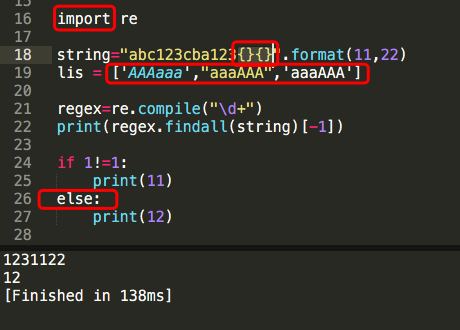
I run the application in macOS with the latest version of Sublime,
but since I created a very long list in a .py file, and used the “replace” function, lots of the syntax colors had bugged (as the figure above, is a part of testing code, some of the keywords are totally white, or in a weird color).
Also, the bug still here after I reboot my PC, even reinstall the Sublime…
I promise that I haven’t changed any build system config, or any settings.
And I cannot get any same problem on google, so there is a little bit confused now…
how should I do?
many thanks
