Sublime Forum

Rendering issue Linux

#1

Hi.

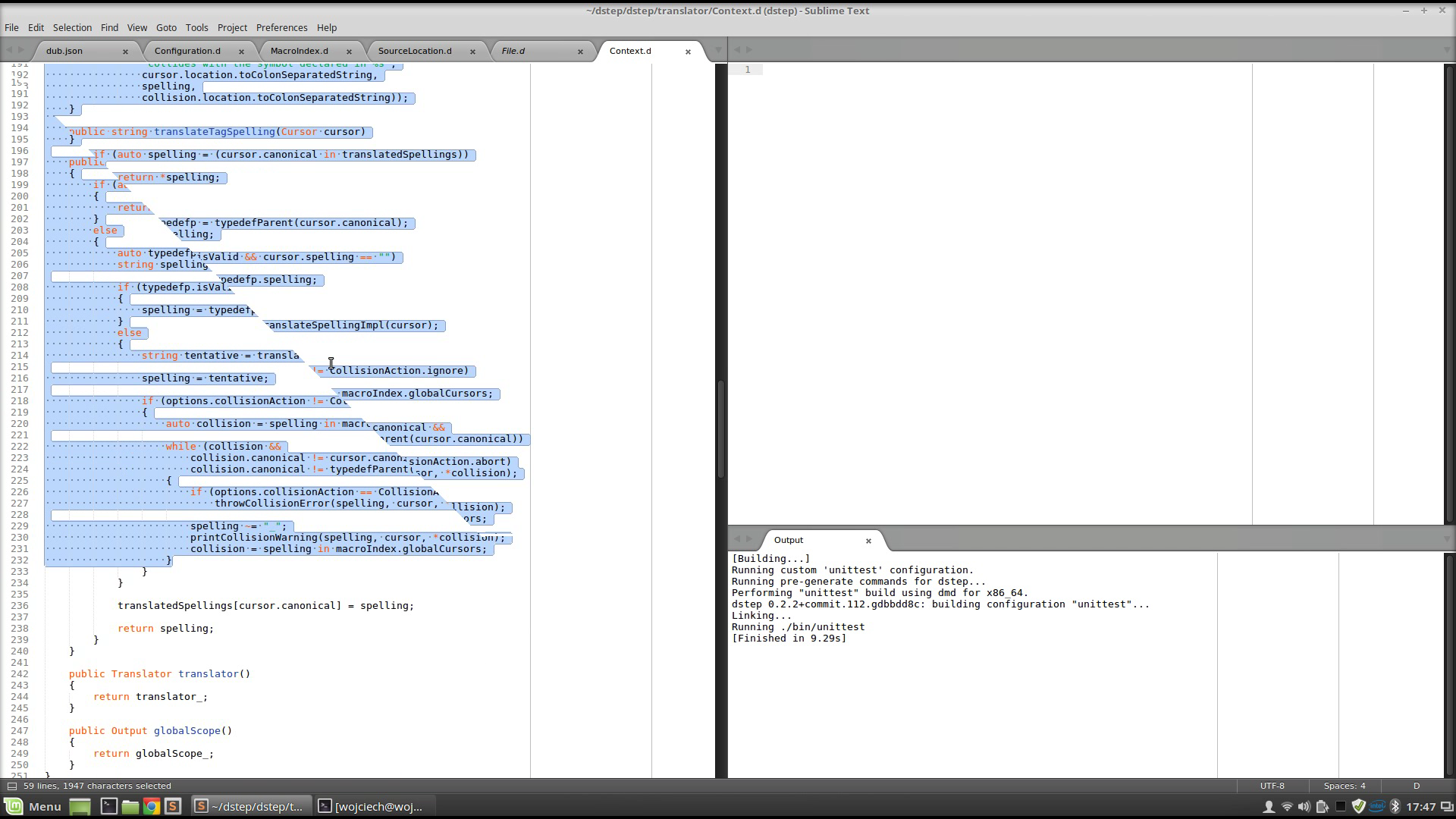
Can you fix the rendering issue occurring when the view is scrolled. It seems like the view consists of two triangles, and they aren’t rendered exactly in the same time. I’m experiencing the issue for some time, I have the most recent development version of Sublime Text 3. It is very distracting.

I attach a frame below, from a movie a took with my smartphone camera that illustrates the issue. Sorry for poor quality. It isn’t through the whole view diameter, due to the slow frame-rate of the camera.

0 Likes

#2

If you take a screenshot using the OS (rather than a camera), does it show this problem?

It looks to me like a graphics card/system issue rather than Sublime. It could be that taking a screenshot from your system grabs what the OS thinks the window should look like, rather than what you end up seeing on screen.

Chris

0 Likes

#3

Well, I’ll try with using some tool to record the problem, but in meantime, I believe it is Sublime related as the seam aligns with the view of sublime text.

0 Likes

#4

Here is a better one captured with gtk-recordmydesktop.

0 Likes

#5

Just to remind, it is still occurring in 3123.

0 Likes

#6

I personally haven’t been able to reproduce the problem. The appearance of it makes me believe there is some sort of issue with double buffering happening with your specific combination of video card and driver.

0 Likes

#7

Bad for me, it seems like you might be right. I switched to nVidia card and it seems like the problem is gone.

However, if it could be helpful, I’m using Linux Mint Linux Mint 18, GeForce GT 740M, HD Graphics 4000. The problem seems to occur when I switch to Intel GPU in prime.

Anyway, thanks for attention.

0 Likes