Sublime Forum

Push button actually pushing to master

#1

Hi!
In fresh 2121 build I’ve got strange behavior: “push” button always trying to push to master and lead to

To git.example.com:example/example.com.git
 ! [rejected]        task-111111-another-task -> master (non-fast-forward)
error: failed to push some refs to 'git.example.com:example/example.com.git'
hint: Updates were rejected because a pushed branch tip is behind its remote
hint: counterpart. If you want to integrate the remote changes, use 'git pull'
hint: before pushing again.
hint: See the 'Note about fast-forwards' in 'git push --help' for details.

The ‘push’ action from dropdown menu doing right:

Total 0 (delta 0), reused 0 (delta 0), pack-reused 0
remote: 
remote: Visit the existing pull request:        
remote:   https://git.example.com:example/example.com/pulls/111        
remote: 
remote: . Processing 1 references        
remote: Processed 1 references in total        
To git.example.com:example/example.com.git
   059fb94..424020b  task-111111-another-task -> task-111111-another-task
0 Likes

#2

The push button pushes a local branch to its tracking remote branch, or displays a quick panel to setup the tracking remote, first.

Cloning a repo, likely checks out the default remote branch (e.g. main) and sets it as tracking upstream, automatically.

To change the tracking upstream branch use Set Branch Upstream command from command palette.

0 Likes

#3

Thank you for reply!
Upstream is actually set to task-111111-another-task, but button trying to push to master (first example). Meanwhile pushing via dropdown menu working as expexted (second example). This starting from 2121, and before this version button worked as expected also (as in second example, both button and dropdown menu)

0 Likes

#4

According to SM’s console, pressing push button just executes git push --progress <remote> <branch-name>, with <remote> being the configuration’s name of remote repo (e.g. origin) and <branch-name> being the local branch to push. It is up to invoked git command to select the configured remote branch to push to in that case.

Actually, both SM 2120 (latest dev build) and 2121 always show correct tracking remote branch(s) when overing the branch name in toolbar or the Push button, which is also the target, a branch is pushed to, on my Windows machine(s), regardless using bundled or globally installed git.

0 Likes

#5

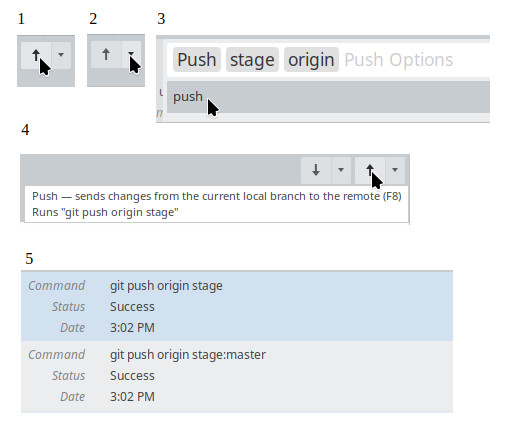
Here is screenshot for both actions below one [5] is button pressing [1] ,
above one [5] is menu item [2] [3]
I’ve noticed that before build 2121 both variants acts like above one “git push origin stage”. I think there is a bug, since the tooltips for both commands is identical and shows [4]

image

1 Like

#6

The 2nd log enty looks suspicious, indeed. They look all normal on my machine (without the :master), though.

Maybe worth filing a bug report at https://github.com/sublimehq/sublime_merge with as many details as possible to help sublimehq to narrow down the root cause.

Maybe OS,

Does it happen with all repos and remotes?

Are those http or ssh remotes?

… not sure what further could help, maybe “Main Menu > Help > Debug Information”

0 Likes

#7

Thanks for reply!

Tried on linux and macos, both same behavior, no matter ssh or http, all the same.
It happens on branches created with git checkout with start point argument, set to master. If I create branch via UI and manually set upstream then both variants works as usually.

Will create bug report.

0 Likes