Sublime Forum

Problems with indentation when I press enter

#1

So, I believe this is more of a settings issue than a bug, but I would like some help with it:
I’m quite new to Sublime, started learning programming a couple of weeks ago and decided to try it.
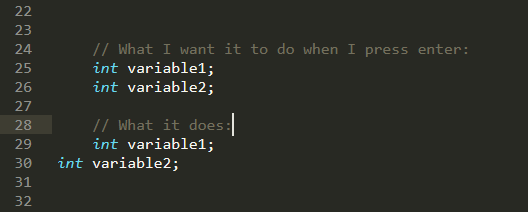
Thing is, the editor I used before had this thing where, whenever I pressed enter, the indentation would stay the same as the previous line, and I got quite used to that.
However, in Sublime, when press enter it goes back to the border of the editor, so I have to keep pressing tab over and over, which, even though it’s not that big of an issue, is quite annoying.
What setting should I switch for it to get fixed?
well%2C%20fuck

0 Likes

#2

The first thing to check is this:

	// Calculates indentation automatically when pressing enter
	"auto_indent": true,

The default is true as seen here, so you may want to check and see if this somehow got turned off.

If that’s not the case, does this problem happen in any kind of file (even a plain text file) or only in specific types of files? If it’s in specific files, something may have set the setting as a syntax specific setting, which overrides the default.

If you determine that’s the case, open a file type where this doesn’t work and use Preferences > Settings - Syntax Specific and either remove the value you see there or add in the default as above to enforce it, depending on what the file looks like.

0 Likes

#3

It was a syntax specific problem, solved it.
Thank you!

1 Like