
I am relatively new to Sublime. When there is an error in the code there’s an error icon next to the line number. And pressing it shows a pop up with the error message. Unfortunately lately pressing on the icon doesn’t open up the message most of the time. Is there anything I can do to fix this?
Alternatively is there a way to show the error message popup directly when an error is found, instead of having to click to open it?
Don’t know if relevant but I’m working with C++ files.
This is the icon I’m talking about:
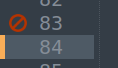
Also I noticed that often the icon appears one line above where the error actually is. So it got very buggy for some reason.