Please anyone helps me about this?
When I click on ctrl+s then create php-tmp file how to resolve this issue please suggest me
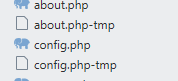

Please anyone helps me about this?
When I click on ctrl+s then create php-tmp file how to resolve this issue please suggest me
If those files are something you don’t want to see in the sidebar, then you have to go to Preferences: Settings from the command palette and copy the file_exclude_patterns setting from the right & paste it on the left as is. Then add .php-temp to that array & save it. That will now not show any .php-temp file in the sidebar.
I’d also double check what packages you’ve installed to see if one of them is doing this (Sublime doesn’t do this by default). Perhaps something related to auto-formatting your code on save or something along those lines.
PHPTools package is doing this thing I removed it from my package list thank friends for giving your useful solution
I just have a problem temp file when save, I make follow this comment and edit a problem well good.
It a problem from Package PHP Tool , I remove it, and clear problem
Thank you