Sublime Forum

Native new window option not working in Gnome 3

#1

Hi,

When running under Gnome on Debian, Sublime Text ignores the native Gnome new window command that can be activated by middle-clicking the dash/dock icon, using a Ctrl+Super+<number> keyboard shortcut, or from the context menu, highlighted below. Instead, an existing Sublime Text window is focused. The custom (duplicate) new window option that Sublime text provides in the context menu does work, but this doesn’t follow the usual Gnome workflows.

Is there any chance these two options can be unified so that the default Gnome behaviour is restored?
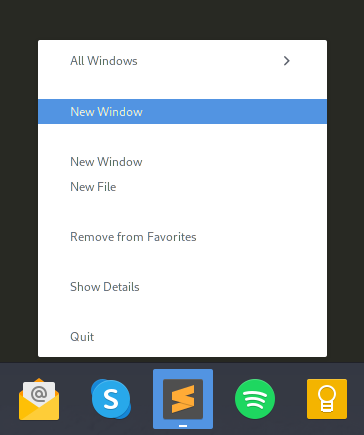
Sublime Text context menu

Sublime Text 3.3.2, build 3211
Gnome 3.36.2
Debian 10

Cheers,
Jon

0 Likes

#2

You may have noticed the other “New Window” menu item, which should work. This turns out to be an issue with the .desktop file. You can fix this yourself by renaming the action “Window” to “new-window” in sublime_text.desktop:

@@ -10,14 +10,14 @@ MimeType=text/plain;
 Icon=sublime-text
 Categories=TextEditor;Development;
 StartupNotify=true
-Actions=Window;Document;
+Actions=new-window;new-file;
 
-[Desktop Action Window]
+[Desktop Action new-window]
 Name=New Window
 Exec=/opt/sublime_text/sublime_text -n
 OnlyShowIn=Unity;
 
-[Desktop Action Document]
+[Desktop Action new-file]
 Name=New File
 Exec=/opt/sublime_text/sublime_text --command new_file
 OnlyShowIn=Unity;

1 Like

#3

I modified sublime_text.desktop as recommended, and now there is only one new window action in the context menu. However, the behaviour is the same as I described above. The change has removed the working action and left the broken one.

Edit: Actually, the Ctrl+Super+<number> shortcut does open a new window, but the context menu action and middle clicking both focus the existing Sublime Text window.

0 Likes

#4

It’s working as expected for me. Can you confirm that /opt/sublime_text/sublime_text -n is opening a new window if run from the command line? Maybe gnome hasn’t reloaded all the desktop files properly? I found that you need to run udate-desktop-database /usr/share/applications and then restart gnome: alt+f2, r.

0 Likes

#5

I can confirm that running sublime_text -n from the command line works fine. I did log out and back in after making the changes before, but I’ll try update-desktop-database tomorrow after I’ve finished work.

0 Likes

#6

It seems that Sublime Text will only create a new window if the last window to be opened has at least one open buffer. If there are no open buffers in the last opened window, then that window will be focused.

This behaviour is different to the issue I originally reported, and it seems that the desktop file fix has mostly worked. The only exception is when I want to open multiple empty windows, for example when setting up workspaces to work on several projects simultaneously.

I wonder if this a bug or by design.

0 Likes