It looks like while loop scope is highlighted wrong with the built-in Lua syntax. The second “end” keyword is excessive and is not part of the while loop. I am looking for a way to change the syntax definition file and fix this.
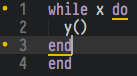
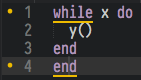

It looks like while loop scope is highlighted wrong with the built-in Lua syntax. The second “end” keyword is excessive and is not part of the while loop. I am looking for a way to change the syntax definition file and fix this.
This feature is provided by the BracketHighlighter package and you should open an issue about it there.
The reason it appears wrong in Bracket Highlighter is because do is it’s own keyword in Lua…
do x end in a file can help you simulate file-scope and it helps you get rid of the 200 local variable limit ( I run into this when my framework compiles all of the files into 2 - one for server and 1 for client - from thousands but with do … end I can simulate the files and gets rid of that )…
So Bracket Highlighter is doing its job in regards of the keywords because while is one, do is another, end is the exit… I love Lua but this is one of its the things I don’t like - using identical SPECIAL keywords for more than 1 thing… I’d much prefer { }s to this…
That being said - I’ll see what I can find out about Bracket Highlighter to come up with a hotfix and submit it when I have time…
Edit: Also - if Bracket Highlighter ends up using Symbols or some other build in feature from Sublime Text to map these things, then I we will need to submit this on the issues board… hopefully I’ll find a definitive answer soon - working on a few other probjects ( Check out XCodeMapper - dev name - https://bitbucket.org/Acecool/acecooldev_sublimetext3 and screenshots to show what it does over CodeMap [ which is a dependency ] https://www.dropbox.com/s/2ov6prv7cfn7sca/Screenshots.zip?dl=0 - categories, easy mapper creation and easily tailored to your individual project - now with CACHING! )
Got it…
Add
and (brackets[0] == "while") ^ (brackets[1] == "end")
to Packages\BracketHighlighter\bhmodules\luakeywords.py - you may need to download Extract Sublime Package from Package Control to extract ( then open the sublime-package with Sublime Text and it’ll extract )…
"""
BracketHighlighter.

Copyright (c) 2013 - 2016 Isaac Muse <isaacmuse@gmail.com>
License: MIT
"""
from BracketHighlighter.bh_plugin import import_module
lowercase = import_module("bh_modules.lowercase")


def validate(*args):
    """Check if bracket is lowercase."""
    return lowercase.validate(*args)


def compare(name, first, second, bfr):
    """Differentiate 'repeat..until' from '*..end' brackets."""
    brackets = (bfr[first.begin:first.end], bfr[second.begin:second.end])
    return (brackets[0] == "repeat") ^ (brackets[1] == "end") and (brackets[0] == "while") ^ (brackets[1] == "end")
With that 1 change, now while … do … end end will only highlight between do and end…
It’s probably not difficult to change the behavior for while to be the one highlighted… but while is used in while and do is used for other things so if I added do end without looking deeper into the back-end then it’ll probably end up messing other things up…
For now, I’m calling this a hack fix - something simply thrown together to avoid the offset… I’ll look into it a little bit later to see what else I can do - I just got up from resting my neck / back so I decided to look at it and found that…
Edit: It looks like for loops are done the same way… I don’t have the file yet in modules but for isn’t highlighted - do is…
Edit 2:
 "open": "(?:(?<=[\\s;])|(?<=^))(if|while|function|do|repeat)\\b",
            "close": "(?:(?<=[\\s;])|(?<=^))(end|until)\\b",
            "style": "default",
            "scope_exclude": ["string", "comment"],
            "plugin_library": "bh_modules.luakeywords",
            "language_filter": "whitelist",
            "language_list": ["Lua"],
            "enabled": true
        },
is in the bh_core.sublime-settings file… do is there…
I’ll try a few things ( one could be to have do by itself without while with a specific rule and some other examples )…
Extracting a complete Sublime package is an exceptionally Bad Idea  and is almost never what you want to do.
As the package description says, Sublime prefers unpacked files in the Packages folder to similarly named files in the sublime-package file. That means that once you extract the package, updates to the sublime-package are hidden from you and you’re effectively locked into the unpacked version.
You’re better off using PackageResourceViewer to open just the file that you want to edit so you only have a single override.
Please see github issue:
The issue is understood, and I am looking into a hook to allow us to look ahead and ignore symbols that are associated to previous symbols to add a little needed context.
Yes - I prefer editing the single file and deleting the rest… I should’ve said that. The one issue though is if the mod-maker didn’t account for this case because sublime api returns an inappropriate value when just 1 file has been replaced ( it returns that the entire package is extracted from what I’ve seen - I need to verify before I report but this is an issue I experienced in another mod where I edited 1 file but because there was logic in the file I edited which checked for extracted package vs not, it looked in the extracted folder and never in the package after that for other files and I didn’t see other logic aside from the sublime api call which lead me to that issue )…
I didn’t know about Package Resource Viewer - thanks for that. It’ll make things easier in the future.