Sublime Forum

Keyboard Layouts Bug on Linux

#1

Hi,

I think there’s this bug on my ST 3.2.2 build 3211 running on Solus Linux. It has been around for several months now.

Just when I start the program, some commands such as Ctrl+C or Ctrl+V do not work. They immediately start working after I switch between keyboard layouts a couple of times (in my case, US English and Russian).

I have three machines with more or less the same software - this bug is there on all three.

Is there maybe a way to fix this? Thanks.
0 Likes

#2

Does this mean that if you’re in US English, switch to Russian and back to US English (or vice versa) resolves the issue? Does it work in one layout and not the other?

The first thing I would check would be to open the Sublime console with View > Show Console and enter sublime.log_input(True) when you notice this happening, then press the keys that don’t seem to work.

That will make Sublime display a log in the console whenever a key is pressed, which will tell you what key Sublime sees the key as. That might shed some light on what keys Sublime is seeing those keystrokes as.

0 Likes

#3

Thanks for the reply, OdatNurd.

It seems that when I turn the console on, the bug disappears. I’ve tested this several times.

I. e.: I start ST, try combinations like Ctrl+C, Ctrl+V, Ctrl+Z - they all don’t work. When I turn the console, they work.

0 Likes

#4

It’s a known bug in ST3 that Cyrillic keyboard shortcuts don’t work like they’re supposed to. If you haven’t already, you will need custom keybindings for making those shortcuts work with a Cyrillic keyboard, see: https://reivan.gitlab.io/2016/10/27/key-bindings-with-russian-layout-in-sublime-text.html. This will be fixed in ST4.

0 Likes

#5

Thanks, but this doesn’t seem the case.

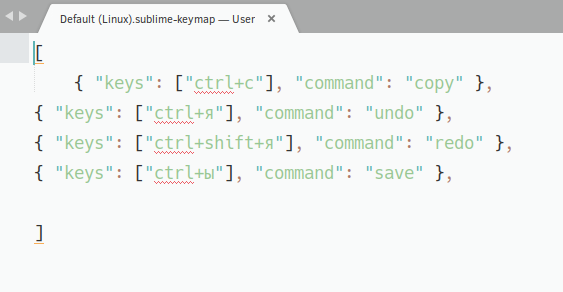
I’ve added the shortcuts to my settings (just in case, attaching a screenshot). But the problem is the same: I open ST3, try those shortcuts - they don’t work. I switch layouts from Russian to English and back - the shortcuts work fine.

P. S. By the way, is the date of ST4 release known?

Screenshot%20from%202021-02-09%2006-36-37

0 Likes

#6

I honestly do not understand why a known bug cannot be fixed, especially in a commercial, and expensive, program.

0 Likes

#7

It should be fixed for ST4. You can join the beta in our discord server.

0 Likes

#8

I use editors for texts, not code, and am not a programmer.

0 Likes