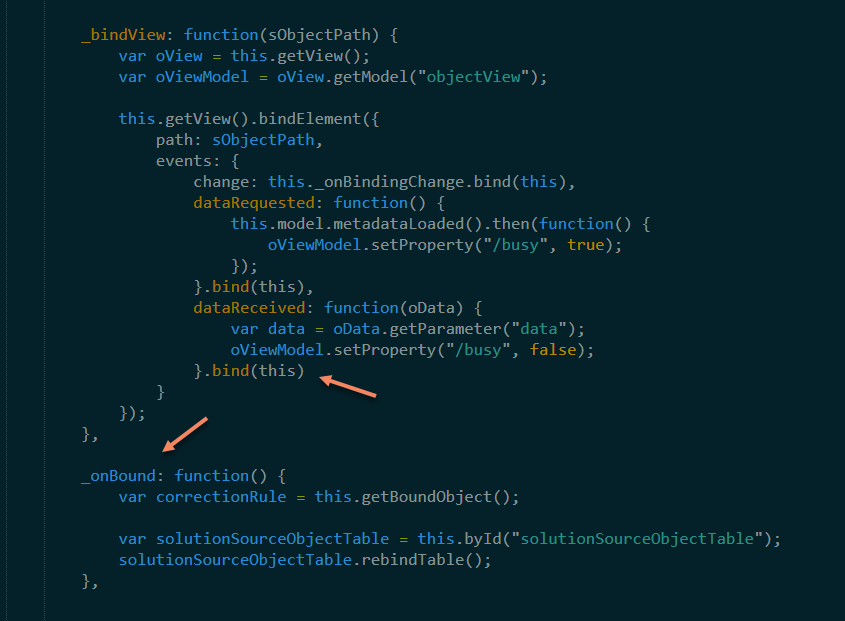
Syntax highlighting seems to brake when using .bind(this) statement without a trailing , at the end of a { } block.
Is there a way I can fix that?

Syntax highlighting seems to brake when using .bind(this) statement without a trailing , at the end of a { } block.
Is there a way I can fix that?
This is the code which is not highlighted correctly:
define([
“Controller”,
], function (
Controller
) {
“use strict”;return Controller.extend(“ObjectList”, {
  	_bindView: function(sObjectPath) {
  		var oView = this.getView();
  		var oViewModel = oView.getModel("objectView");

  		this.getView().bindElement({
  			path: sObjectPath,
  			events: {
  				change: this._onBindingChange.bind(this),
  				dataRequested: function() {
  					this.model.metadataLoaded().then(function() {
  						oViewModel.setProperty("/busy", true);
  					});
  				}.bind(this),
  				dataReceived: function(oData) {
  					var data = oData.getParameter("data");
  					oViewModel.setProperty("/busy", false);
  				}.bind(this)
  			}
  		});

  	},

  	_onBound: function() {
  		var correctionRule = this.getBoundObject();

  		var solutionSourceObjectTable = this.byId("solutionSourceObjectTable");
  		solutionSourceObjectTable.rebindTable();
  	}
});
});
And this is the code which is correctly hightlighted. The difference is only the , at the end of }.bind(this)
define([
“Controller”,
], function (
Controller
) {
“use strict”;return Controller.extend(“ObjectList”, {
  	_bindView: function(sObjectPath) {
  		var oView = this.getView();
  		var oViewModel = oView.getModel("objectView");

  		this.getView().bindElement({
  			path: sObjectPath,
  			events: {
  				change: this._onBindingChange.bind(this),
  				dataRequested: function() {
  					this.model.metadataLoaded().then(function() {
  						oViewModel.setProperty("/busy", true);
  					});
  				}.bind(this),
  				dataReceived: function(oData) {
  					var data = oData.getParameter("data");
  					oViewModel.setProperty("/busy", false);
  				}.bind(this),
  			}
  		});

  	},

  	_onBound: function() {
  		var correctionRule = this.getBoundObject();

  		var solutionSourceObjectTable = this.byId("solutionSourceObjectTable");
  		solutionSourceObjectTable.rebindTable();
  	}
});
});
The current version of the core JavaScript syntax highlights both examples correctly. Are you using a third-party syntax?
the version that ships with the latest ST stable/dev build doesn’t though, so it seems the problem has since been fixed in the master branch
Thanks for your comments.
Is there a possibility to update the syntax? Maybe some configuration file?
Otherwise I would wait for the next update and hope this to be fixed then.
Two options:
Packages/JavaScript/JavaScript.sublime-syntax.