
Any italicised text in the UI (not the code editor!) appears to be broken. More specifically, it’s abnormally wide and pixelated/aliased. Here is a screenshot of searching for new packages to install:
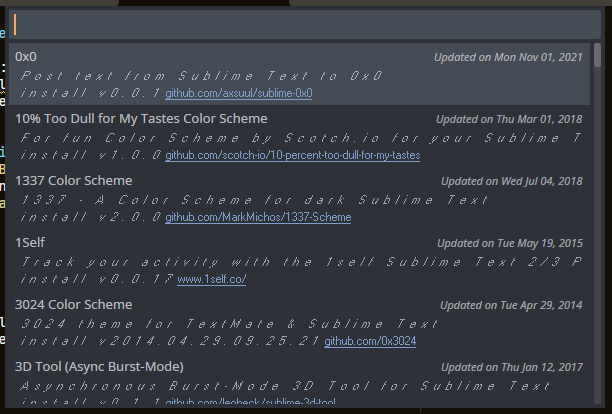
I use Windows 10 Pro version 22H2, Sublime Text build 4215.
It’s probably important to note that I have at some point replaced my default system font with Noto Sans. (The default is Segoe UI.) I have seen this cause problems with some software, such as Processing becoming completely unreadable. (Luckily I’m not interested in touching that ever again!)
I have spotted these 2 lines in the console:
font face "Segoe UI" could not be found, defaulting to "MS Sans Serif"
font face "Segoe UI" could not be used with direct write, using gdi instead
I tried customizing the theme font to no avail. I can change the font of everything except for that italics text. I’m guessing Sublime Text is hardcoded to use Segoe UI on Windows, which is a shame.