
Hi all!
Suppose I am trying to type 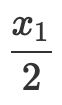 in LaTeX. The LaTeX syntax for this is
 \frac{x_{1}}{2}.
\frac{}{} is for writing fractions; x_{} is for writing subscripts.
To make things easier, I have created a snippet for fractions:
...[\frac{$1}{$2}$0]...<tabTrigger>fra</tabTrigger>....
I have created a snippet for writing subscripts as well.
However, it seems that I cannot enable the snippet for subscripts in the field $1 of the snippet for fractions without breaking the loop.
Whenever I enter the trigger word for subscripts + tab in field $1, after tab being hit, the snippet won’t get invoked and the cursor jumps straight to $2, leaving only the trigger word. In $1, I have to press esc, then I can invoke a different snippet.
Is there a fix to this? I know it seems like a minor problem but it can be huge productivity boost. Apparently, someone wrote a LaTeX plug-in in VS Code that can do this, but I want to replicate the same thing in Sublime Text…
Anyone knows where to start? I have been looking for the solution all evening but still couldn’t find anything useful…
Many thanks!