
Hello everyone 
I very love Sublime-Text 3, and I am using it for various kind of projects (web, C++, node, …). I love it so much that I am using it despite those awful glitches (see the image).
Those glitches appear at random time (when I move the cursor around) and on random lines (one or severals as you can see on the image).
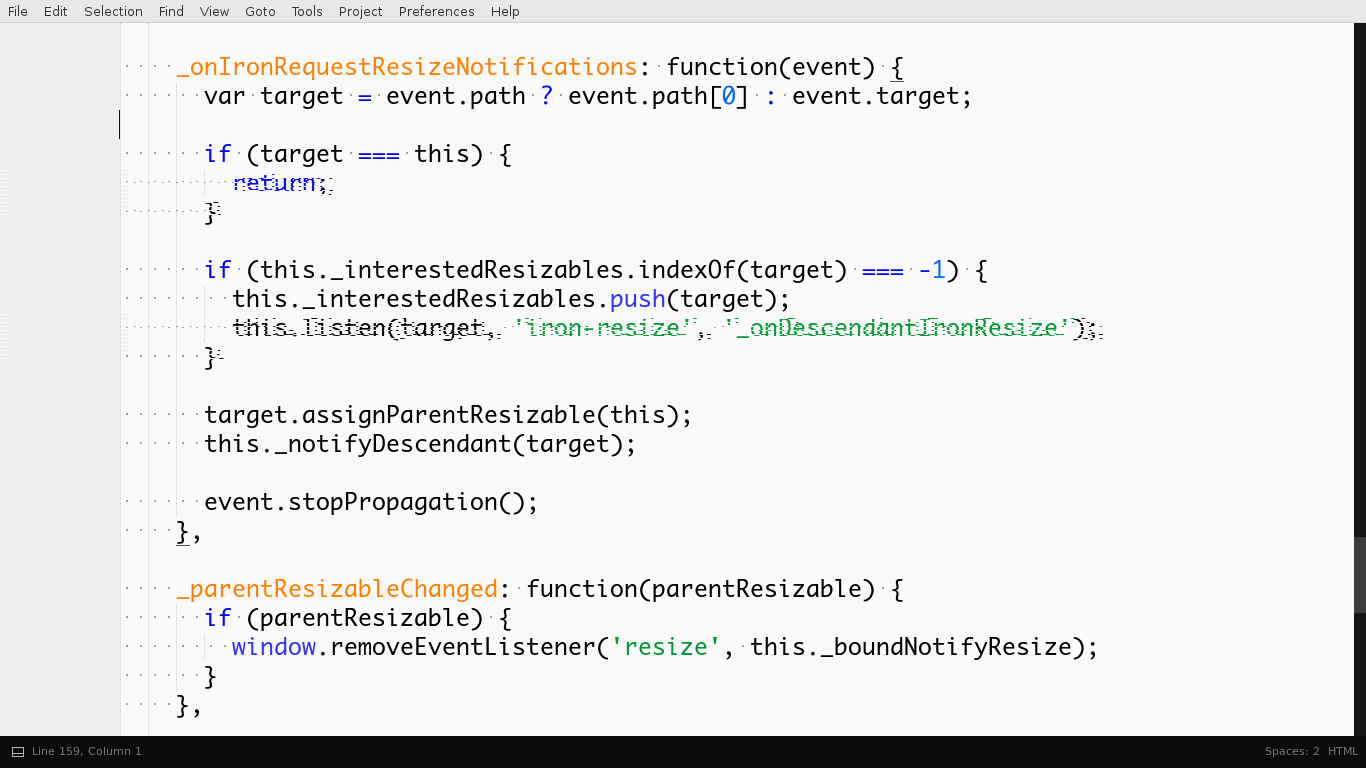
At first I didn’t care so much because i just move the cursor and it disappears (or appears on another line I don’t have interest to look at. But well, this is visually frustrating over time. And I hope someone could help me and tell me what I should do to remove those ?
I tried to change in the preferences (no_antialias, gray_antialias, subpixel_antialias, …) but nothing works.
Thanks in advance,
note: those glitches only appears in the text-view. Tabs, side bar, status bar are not affected by those graphical problems
note2: I am using “fedora 25 x86_64” if that could help to mention
note3: These glitches appears since a fresh installment of ST, changing the theme or font doesn’t resolve the problem.
note4:These glitches appears everytime I move my cursor (even when I type), but strangely enough, sometimes the glitches disappear all for some time and appear again (I don’t know what triggers it)