Sublime Forum

How to use new beta features?

#1

I finally upgraded from ST3 full release to the latest 64bit Windows beta. I would like to try some of the new features such as image preview, tab scrolling with the mouse wheel, etc.

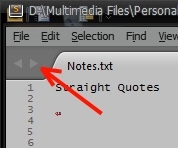
However, I can’t seem to figure out what to do. I see two new navigation arrows (shown in below image); but nothing happens when I click on them when I have several tabs open. I tried using my mouse wheel after clicking on one of my tabs; still nothing. I also couldn’t find any menu items related to image preview. Is there a guide that shows how to use these new features?
0 Likes

#2

Those arrows scroll the list of tabs; they don’t actually change which file you’re looking at. You need to have a lot of tabs open for them to do anything.

Image preview is automatic - try opening an image.

0 Likes

#3

Thanks! I actually ended up disabling the scrolling tabs feature since I never would come close to reaching that many tabs open; and, didn’t to see those arrrows.

I was also able to view an image file; although, I’m not sure what I would use that for since I already have an image viewer. I guess, if there was a plugin/builtin feature that could display an image thumbnail when the mouse hovers over an image file reference such as “Z:\Desktop\screenshot.jpg” in a script/code, that would be pretty useful.

0 Likes