
My English is poor, sorry!
I want to do this : when press tab key , if the cursor is before “)” or “}”, then place the cursor after “)” or “}”.
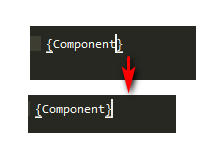
any one know how to do it ? thank you very much.
PS : I find someone define keys like bellow:
I think this can help to achieve what I want,any thread tell about detail parameters of key binding ?
{
        "keys": ["tab"],
        "command": "expand_abbreviation_by_tab",

        // Extend Emmet to js & jsx
        "context": [
            {
                "operand": "source.js",
                "operator": "equal",
                "match_all": true,
                "key": "selector"
            },

            // run only if there's no selected text
            {
                "match_all": true,
                "key": "selection_empty"
            },

            // don't work if completion popup is visible and you
            // want to insert completion with Tab. If you want to
            // expand Emmet with Tab even if popup is visible --
            // remove this section
            {
                "operand": false,
                "operator": "equal",
                "match_all": true,
                "key": "auto_complete_visible"
            }
        ]
    },