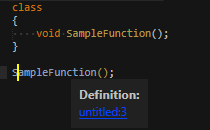
This color is controlled by the color scheme. The easiest way to configure it would be to create a color scheme customization (a file in the Packages/User directory with the same name as the color scheme file) with the following content:
{
    "variables": {
        "--bluish": "#123456"  // put your desired color here
    }
}
This will have an effect on all kind of popup links, and possibly for other popups & underlines from plugins as well.
If you’d like to change only the link color in the “Definitions” popup but nothing else, you could override the symbol.py file from the Default package. You can view this file e.g. via View Package File from the command palette, search for the html code for the body id=show-definitions popup, and add a CSS rule for the a tag. To make such an override for this file, it must be saved under Packages/Default, but I wouldn’d recommend it, since it would discard potential future updates for this file.
There is also a third way via the “popup_css” key in the color scheme ("#show-definitions a {color: #123456}"), but I neither would recommend that, because when used, some predefined CSS styles for popups are not applied automatically.