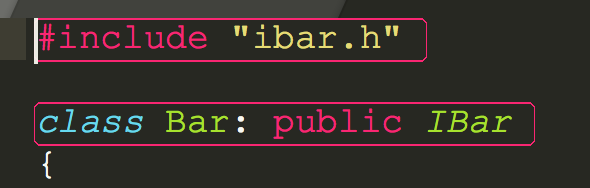
Hello, I am new to the forum and was struggling with some c++ syntax stuff.
I am writing a simple c++ project and header files are located in different folders inside the project folder.
I installed Clang-Complete package.
Somehow, the editor will show me some header files are not fund error in the console and also some red-pinkish box around the lines where the error is detected. They are quite disturbing.
I dont need sublime to build the project because I will build by myself. I only need it as an editor with some auto completion feature. How can I remove those error messages and also the big boxes surrounding my code.
“gtestexp/libbar/bar.h:1:10: fatal error: ‘ibar.h’ file not found”
“gtestexp/libbar/bar.h:3:19: error: expected class name”
Please help. I’ve struggled for multiple hours.