
How could I remove any of the in-between added selections (currently I can remove the last added selection only via ctrl+U)?
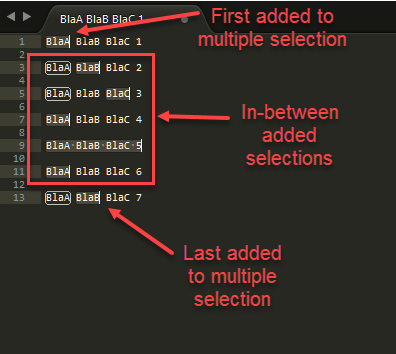
How could I remove any of the in-between added selections?
omareg94
#1
0 Likes
r-stein
#2
You can open the ST console ctrl+` and write del view.sel()[2] to delete the third selection and change the number for other selections. If you want to keep only the first and last selection you could write
s, t = view.sel()[0], view.sel()[-1]; view.sel().clear(); view.sel().add(s); view.sel().add(t)
If you want to use a keybinding driven approach you could install MultiEditUtils with selection fields.
Then for example add these keybindings
    // default use of selection_fields
    {
        "keys": ["alt+d"],
        "command": "selection_fields",
        "args": {"mode": "smart"}
    },
    // jump and remove current selection in selection_fields
    {
        "keys": ["alt+shift+d"],
        "command": "selection_fields",
        "args": {"mode": "smart", "only_other": true}
    },
    // cancel selection_fields and remove current selection
    {
        "keys": ["ctrl+alt+d"],
        "command": "selection_fields",
        "args": {"mode": "toggle", "only_other": true}
    },
Adapt the keybindings as you want. Then you can press alt+d make selections as fields, press alt+d or tab or shift+tab to jump between the fields. Press alt+shift+d to go to the next field and erase the current and ctrl+alt+d to make the fields back selections, but remove the current field. Press escape to make the fields as selections and keep the current selection.
0 Likes