I modified a G-code syntax highlighting.
But I need the highlight all after ;
How can i do this?
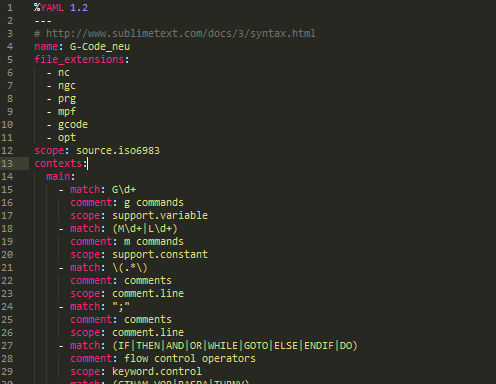

I modified a G-code syntax highlighting.
But I need the highlight all after ;
How can i do this?
If it is the comment you want to change the simplest change would be:
- match: ;.*
  scope: comment.line
What kind of CNC do you use?
The package CNC SINUMERIK language support intends to provide fully qualified G-Code support for use with SINUMERIK 828D and 840D.
There is also a package for Bosch Rexroth MTX out there.
Thanks.
How can I edit this syntax package?
I use sinumerik at the most time, but sometimes I also need MTX.
For Bosch Rexroth MTX your might want to checkout this: CNC BoschRexroth MTX
This should fullfill most of your needs. Even though it is not as complete as my SINUMERIK package.
You won’t succeed in just editing SINUMERIK syntax as Bosch MTX is far more unstructured bullshit which allows nearly all constructs. It is nearly impossible to make a good highlighter for MTX.