
Hi everyone, tried to see if there was already a topic on this but not exactly sure how to describe it. I’m running ST4.215 on Ubuntu. Since the last update, I’m seeing a weird behavior I don’t know what it is or how to turn it off. Basically, the first line of the code is “commented” into the first line of the code block (second line of the file).
I thought maybe it was trying to be helpful about what code block I was currently in, but it doesn’t matter where my cursor is, so even if I go into a completely different code block section, that echo is still in the 2nd line:
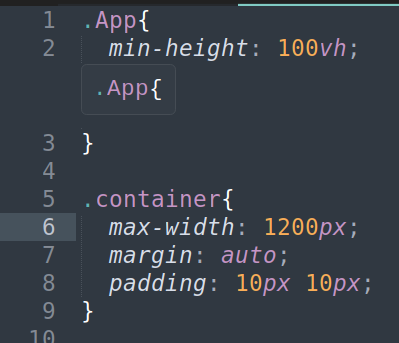
If I put in a line break above line 1 it goes away. If I’m in a bit of code that has import statements at the beginning of the code, they aren’t repeated. It’s not just CSS, seeing it in my js files as well. (I would post a pic but I only have one image since this is my first post). I assume this is some new setting that got set to “on” when I upgraded, but I don’t really like it and would like to turn it off but don’t see anything in the menus/options that stands out as the culprit. Does anyone know how I can turn off this feature?