Sublime Forum

F11 doesn't show in menu

#1

Hello!

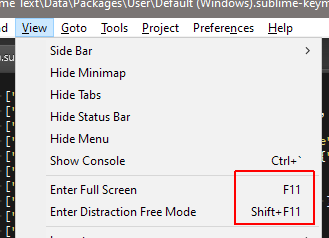
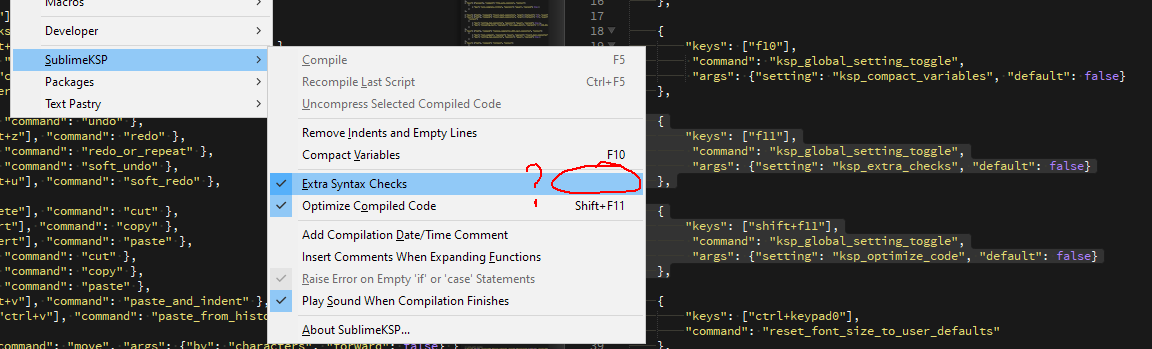
Weird thing happening here. I am reassigning F11 and Shift+F11 to different commands. This is all fine and dandy, they work. However, in the menu itself, only Shift+F11 is shown as a shortcut next to the command, while F11 is not.

If I remove my custom assignment to F11 (which was fullscreen), it reappears for View->Fullscreen menu just fine. So why doesn’t it want to show next to my reassigned command? Screenshots:
image

Thanks!

(Oh and BTW - latest version of ST3, of course!)

0 Likes

#2

How is the item in the menu defined?

When deciding if a command matches between a key binding and a menu entry (or command palette entry) the command name and the provided arguments are used as a part of the match.

Basically if the key binding contains an args key, then it will only appear in the menu or the command palette if the entry there also includes an args key and has the exact same value (for example even if one is "args": {} and the other has no "args" key, it’s not considered a match.

0 Likes

#3

This is how that command is defined in the menu file:

{
	"command": "ksp_global_setting_toggle",
	"args": {"setting": "ksp_extra_checks", "default": true},
	"caption": "Extra Syntax Checks",
	"mnemonic": "E",
	"id": "extra_syntax_checks"
},
0 Likes

#4

I think your issue is that the value of the default parameter is different between the two places; so Sublime doesn’t think pressing the key is going to do the same thing as picking the menu item will.

0 Likes

#5

That was it! Setting the default to True worked. Thank you!

0 Likes