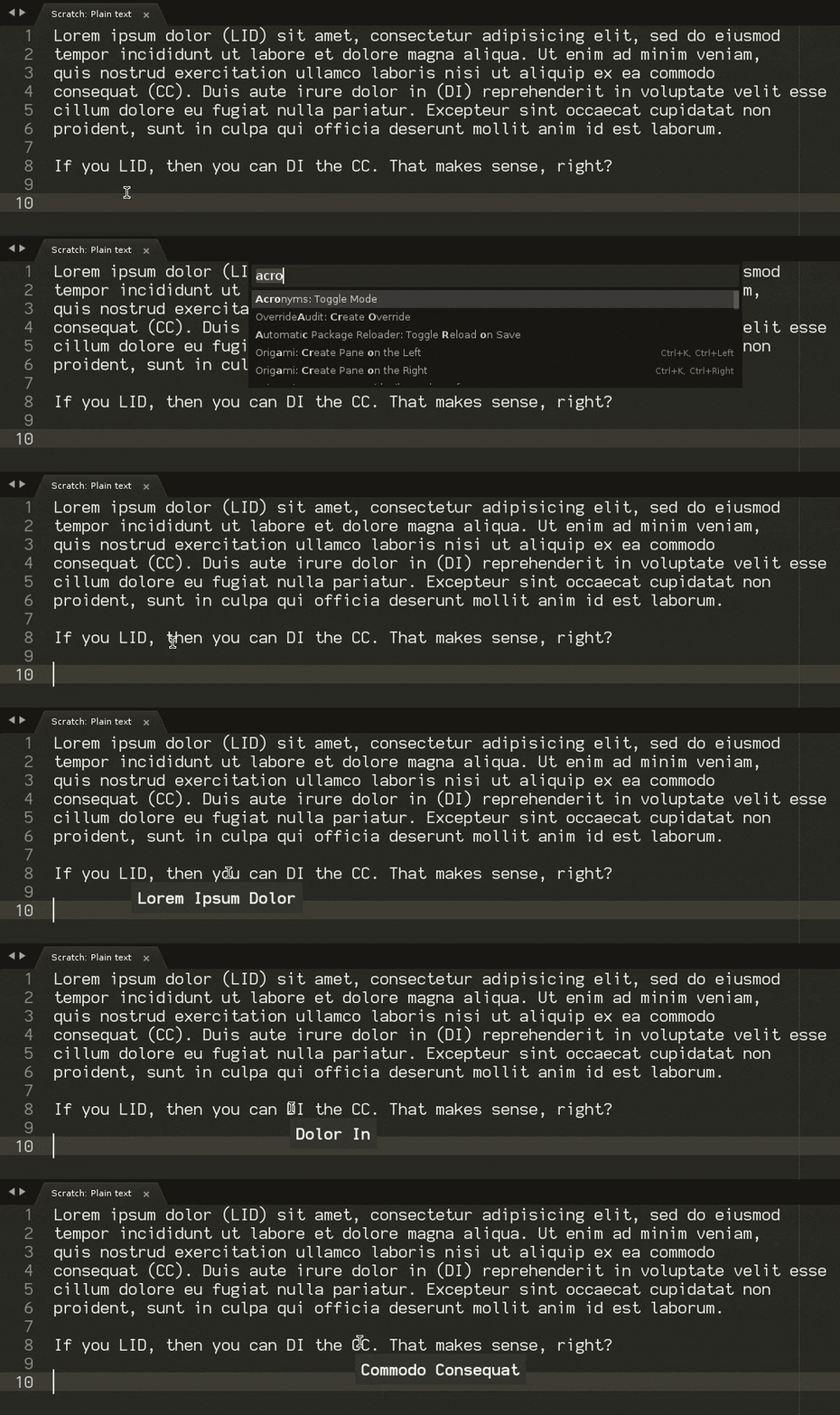
I’m not aware of a package or plugin that does this (nothing obvious jumped out on Package Control anyway, though perhaps I didn’t use the correct terminology).
However, a plugin that does something similar to what’s outlined in the video you posted would be the following (see this video if you’re not sure how to use plugins in Sublime).
import sublime
import sublime_plugin

import functools


def update_acronyms(view, remove=False):
    if remove:
        view.erase_status('_acronym_mode')
        return view.settings().erase('_acronyms')

    acronyms = []
    regions = view.find_all(r'\(([A-Z]+)\)', 0, '$1', acronyms)

    result = dict()
    for idx,acronym in enumerate(acronyms):
        span = None
        word_pos = regions[idx]
        for _ in range(0, len(acronym)):
            word_pos = view.word(sublime.Region(word_pos.begin()-1))
            span = word_pos if span is None else span.cover(word_pos)

        definition = view.substr(span).title().strip().replace('\n', ' ')
        result[acronym] = definition

    view.set_status('_acronym_mode', '[AM]')
    view.settings().set('_acronyms', result)


class ToggleAcronymModeCommand(sublime_plugin.TextCommand):
    """
    Enable or disable Acronym mode in the current buffer, depending on the
    current state.
    """
    def run(self, edit):
        mode = self.view.settings().get('_acronym_mode', False)
        self.view.settings().set('_acronym_mode', not mode)

        update_acronyms(self.view, remove=mode)


class UpdateAcronymListCommand(sublime_plugin.TextCommand):
    """
    If acronym mode is turned on for the current buffer, rescan the document
    for new acronyms.
    """
    def run(self, edit):
        update_acronyms(self.view)

    def is_enabled(self):
        return self.view.settings().get('_acronym_mode', False)


class AcronymListener(sublime_plugin.ViewEventListener):
    pending = 0

    @classmethod
    def is_applicable(cls, settings):
        return settings.get("_acronym_mode", False)

    # This only gets called if on_modified_async is enabled below.
    def update_acronyms(self):
        self.pending -= 1
        if self.pending != 0:
            return

        update_acronyms(self.view)

    # Un-comment the following three lines to have the document re-scanned for
    # new acronyms while you're editing. While this is commented, you need to
    # use the update command instead.
    # def on_modified_async(self):
    #     self.pending += 1
    #     sublime.set_timeout_async(functools.partial(self.update_acronyms), 250)

    def on_hover(self, point, hover_zone):
        if hover_zone != sublime.HOVER_TEXT:
            return

        word = self.view.substr(self.view.word(sublime.Region(point)))
        acronyms = self.view.settings().get("_acronyms", {})
        definition = acronyms.get(word.strip(), None)

        if definition is not None:
            self.view.show_popup('<b>%s</b>' % definition,
                sublime.HIDE_ON_MOUSE_MOVE_AWAY, point)
To use this you also need to create a sublime-commands file such as AcronymMode.sublime-commands as well, with the following content. The name of the file doesn’t matter as long as the extension is correct; you want to put it wherever you put the plugin.
[
    { "caption": "Acronyms: Toggle Mode", "command": "toggle_acronym_mode" },
    { "caption": "Acronyms: Update Acronym List ", "command": "update_acronym_list" },
]
Use the first command palette entry to toggle the mode on or off (it’s per buffer); alternatively you can also bind that command to a key if you’d rather do it that way. The text [AM] gets added to the status bar for any file that’s got the mode turned on.
The list of acronyms is gathered when the mode is turned on; toggle it on and off or use the other command to update the list if you’re actively editing the file. There are three commented out lines that define an on_modified_async method which will cause the list of acronyms to be kept up to date while you’re typing; remove the comment on that if you want that kind of action (I’m not sure if the emacs version does that; Lisp is not my jam).
I whipped this up in 10-15 minutes so it’s not heavily tested; the failure case is more or less just spam in your console if something goes wrong though.