Sublime Forum

"Definitions" popup renames file to desktop

#1

POPUP APPEARANCE
The popup is a brown rectangle, 2px SlateGray border, inside of border 10px top-bottom and 8px left-right to popup text-only content. Popup is always titled, “Definitions”. Popup title font is Arial, color white, bold 12pts, aligns left. Also, aligned left under title, there is a list, same font, color aqua, normal font weight, links only, links underline color aqua, each link on new line, each link is the filename of the file open in Sublime Text 3126: that is, the active file. Each “Definitions” link list filename is followed immediately to right of file name by a colon and then immediately followed by a random sequential whole number. By random sequential whole numbers, we mean the whole number string begins at a random whole number, and then counts a random consecutive string of sequential whole numbers up until the file-name list ends. I have seen the whole number link string begin anywhere from ‘0’ up to ‘245’. The brown popup box expands in size to exactly fit the “Definitions” title, and beneath title the ‘filename:number’ list, with text margins as noted.
POPUP BEHAVIOR
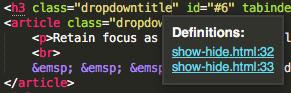
When the cursor enters the double-quotes of HTML built-in attribution, for example cursor moves into or over quotation for class=“anydata” or style=“anydata”, then the popup occurs. Behavior is immediately reproducible. Popup ‘filname:number’ links are all active. When any link is clicked, then the open active file containing the clicked ‘filename:number’ link auto-closes Sublime Text tab, and new file with identical file contents opens new tab with name ‘filename:number’ on desktop of Mac Pro, with filename extension of the closed file. For example, while editing file show-hide.html, mouse hovers inside double-quotes for attribute class=“dropdown”: immediately "Definitions popup appears and under title are two links, ‘show-hide.html:32’ and ‘show-hide.html:33’. We click link ‘show-hide.html:32’ and the show-hide.html file tab in Sublime Text 3126 slams shut, instantly replaced by a new tab “show-hide.html:32” and a new file appears on desktop named “show-hide.html:32.html.html”. The ST3 desktop file creation is immediately manually deleted. Original file is checked and appears okay, but content is copied, original file deleted, and replacement in original folder. Apple, shrugs, “Ask Sublime.”
HELP!
I have never seen anything like this ever, in 30 years of computing. WHAT IS GOING ON?
0 Likes

#2

Mac Pro late 2016 (Early 2013 model) ships with macOS Sierra 10.12.0, upgraded out-of-box to macOS Sierra 10.12.1. Install Sublime Text 3126, no other apps on machine… No PackageControl.io, or other customizations. Customizations and installation of other apps does not change “Definitions” bug. Uninstall and reinstall of Sublime, OS and Sublime does not change the bug.

Could problem be compat with macOS Sierra 10.12.1? Many developers writing wide range of apps are having compatibility problems. Apple generally attributes app developer problems to SIP.

‘SIP’ or whatever may also be impacted by Network issues, specificallly further distancing of Region 3 node administration. Data transfer across old colonial borders in North America (here we go, again). FTP software is more negatively impacted than any other software type on my machine, located in Canada. All of my publishing activity is cross border. Other global extensions of the colonial geopolitical rift include removal of Netflix and HBO access in Canada. This parallels ‘Brexit’ shift from backroom Western European ownership of Americas’ node networks, to Russian ownership. Geopolity aside, FTP is do-able on my Mac, with a utility called ForkLift - only one that works, out of about ten damn Attempt$.

0 Likes

#3

can you share your original show-hide.html file please

1 Like

#4

Here’s the code. If you want system-level structural analysis, we’'ll need to share with an email attachment. But it does it with every file, big-small, scripted-unscripted. macOS Sierra and user environment are both hosted on disks in an external enclosure. All network and component harrdware is hardwired.

https://codepen.io/Riverleaf/pen/yVMVJY

0 Likes

#5

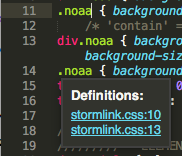
cursor at end of .noaa class

0 Likes

#6

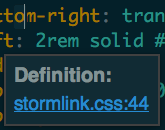
Okay, notice the filename is “storm-link.css” always now. Is someone using Sublime to hack me? Years ago got a friendly ‘okay-to-use’ from NOAA concerning Big Bird at Storm-Link - my tracking shows the site pulled in by CDN service in Taiwan, c/o China, I guess. Not exact NOAA logo, but similar, intended mostly for Captains, quick online weather hub access. NOAA, life-saving ad. Anyway, Sublime is working on ‘text-warp.html’ on my desktop, and that is where these “storm-link.css” Definitions are happening. Storm-link files all closed, reboot so no personal use/connection to storm-link. But look at this!

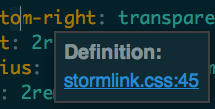
And now, move my mouse up and to right a little, another popup.

Two popups. You can see Definitions use ‘storm-link.css’ again. Today, style is in head tag of ‘text-warp.html’. "Definitions’ title is changed to ‘Definition’. Font size matches for Sublime window and popup window: was default 10, now is Monaco 18. When I move cursor, link number changes.

Apple is happy you are working on this bug. Hope this isn’t changing my files. Sorry, but not sure NOAA would appreciate this code floating around on a Pen. If you want look, personal email only.

0 Likes

#7

I HAVE PURCHASED ANOTHER SUBLIME TEXT LIENSE.
Moved my business license from Riverleaf™ to RIVERLEAF. Big ugly capitals, like the rest of that license. You can swap it back to Riverleaf™, any time. Important thing, is drop some quid in the bucket, mate! Sublime is an amazing product. Look, my last support for Sublime was Version 104. Sweet! We’ve come all the way to 3126. Now all’s we need is color text control in this forum, wink-wink nudge-nudge. And squash this Definition Bug!

To repurchase, I did not use the ‘Remove license’ and ‘Purchase license’ options, I went straight to home page "Buy’ option. User settings transferred over.

Hope this helps.

I have not failed.
I’ve just found 10,000 ways that won’t work.

 Thomas A. Edison

1 Like