Sublime Forum

Custom Snippet Placeholder issue?

#1

I created a custom snippet for JavaScript arrow function. A JavaScript arrow function can often be in the following forms:


() => foo

() => {
  foo;
  bar;
}

foo => foo * 2

foo => {
  bar;
  return foo * 2;
}

(foo, bar) => foo * bar

Basically, both the parentheses and the curly braces are optional. So I made a snippet like this:
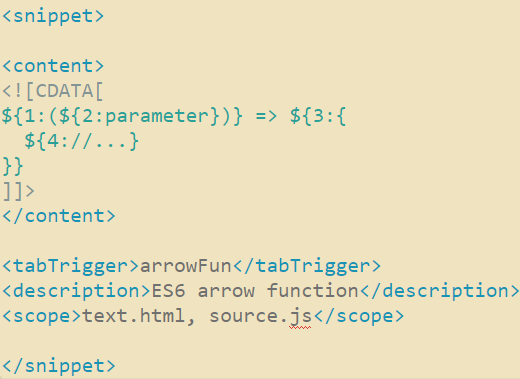
However, when I tab to field 3, the selection doesn’t include the right half of the last curly braces. I don’t know if I did something wrong or it’s a bug?

Thanks!!

0 Likes

#2

It doesn’t know that the opening brace of the method body ‘obviously’ has a matching closing brace, and so the first brace on the last line ends the placeholder. The second brace on the last line therefore becomes unconditional.

As with many things, the solution is to add a backslash :smiling_imp: (before the first brace on the last line)

1 Like

#3

https://packagecontrol.io/packages/PackageDev 's highlighting of snippets would also make this clearer if you install that package

0 Likes

#4

Thanks frou! Backslash worked!!

Thanks kingkeith! Installed! (although the .sublime-snippet file didn’t appear to be different, still xml)

0 Likes

#5

you may need to close and reopen the snippet file to get the improved highlighting

0 Likes

#6

Yes you’re right. What I did before was I switched project and switched back, I thought that would serve as re-open the snippet. Apparently it wouldn’t.
So today I learned that switching projects actually don’t close and re-open files.

0 Likes