Sublime Forum

Collapsible "Open Files" and "Folders" on sidebar no longer collapsible

#1

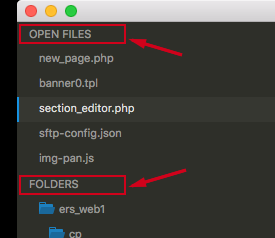
I noticed that as of 3.0 these are no longer collapsible. It used to be I could just click on one and it’d collapse. I’d love to see this functionality return. …Unless this is more a function of my Theme and not Sublime itself, in which case I should be posting on the Boxy forums (if they exist). Any thoughts?
0 Likes

#2

These have never been collapsable.

You can hide the “Open Files” section using the View > Side Bar menu. The folders underneath the “Folders” label can be collapsed, but it appears you have installed a theme that hides the arrows. If you click the folder name, it should collapse.

0 Likes

#4

Ahh, yes, I see what you’re saying. I never really need or want to close the “Folders” section, only the “Open Files” section, and I see that menu option now. Thank you.

0 Likes

#5

Actually, they was collapsible, but Default.sublime-theme didn’t use that by default.

You can install ST 3126 and update Default.sublime-theme code to:

{
  "class": "sidebar_tree",
  "indent_top_level": true, // false by default
},

That doesn’t work starting ST 3127.

0 Likes

#6

Thanks ihodev.
And yeah, you’re right, they definitely were collapsible in version 2, I collapsed Open Files every time I opened Sublime. I never collapsed Folders, but I know that definitely collapsible too.

Wbond was wrong about them never having been collapsible, but he was right about the menu option to hide Open Files, and that seems to work fine for me.

0 Likes