Sublime Forum

CodeAutocomplete background color

#1

Hi,
I would like to change how the Code Autocomplete popup looks like when I have selected the “Solarized Light color theme” using the “Default UI theme”. Right now it looks like as follows
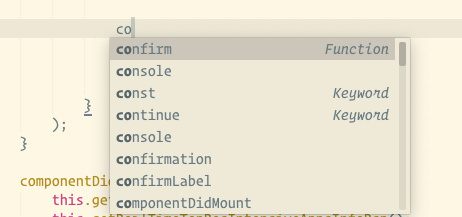
I would like the background of the code complete window to be a shade of “black” and the highlighted text to be some shade of “yellow”.
Is this possible ? If Yes, then can can you please let me know how ?

Thanks and Regards
Gagan

0 Likes

#2

@gj1118 Customizing or Overriding Packages

0 Likes

#3

@roblav96, I tried following those steps , but unfortunately it was not working for me .

Thanks
Gagan

0 Likes

#4

The autocomplete popup background color is controlled by some property on the color scheme. I am not sure which one and also I am not sure if only the autocomplete popup background itself/alone is customizable. You can try editing the Solarized Light color scheme and see if you figure out which property changes the popup background. You can also read the default documentation for color scheme https://www.sublimetext.com/docs/3/color_schemes.html

0 Likes

#5

Found it, It is set by the background color of the color scheme

CloudApp

that said, it changes the background color of the editor window as well, which is not what I want. I want the editor background theme to remain as is, but I want the autocomplete color to be set independently of the editor window.

I wonder how cobalt2 does it … :thinking:

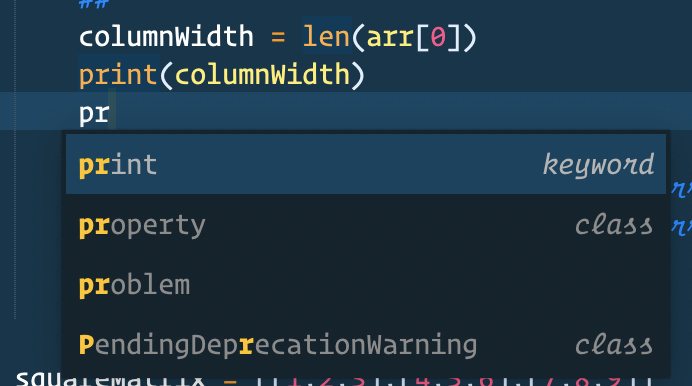
In cobalt2 the autocomplete background color is independent of the editor background color. This is exactly what I would like to have,

Thanks

0 Likes

#6

You should be able to reverse engineer the theme. Usually by trying to breaking it until you figure out what does it is doing.

0 Likes

#7

The auto-completion panel’s colors are controlled via *.sublime-theme file. It is represented by the auto_complete class.

The selected row is represented by

  {
    "class": "table_row",
    "attributes": ["selected"],
    "parents": [ { "class": "auto_complete" } ],
  },
0 Likes