Sublime Forum

Code Fold Ruler Color?

#1

I’m looking for a way to change the color of the “rulers” that appear under code folding points. You can see them faintly here:
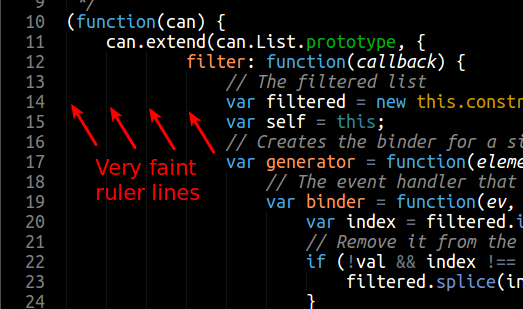
Now keep in mine these are NOT the regular “ruler” lines you’ll find in the “Settings - Default” file. Sublime’s rulers go up and down the whole length of the document. These “fold rulers” appear at code fold points and disappear accordingly (for instance, between { } on different lines).

Basically, I want them to be more noticable. Is this possible?

Thanks!

0 Likes

#2

You’ll want to modify your theme’s .tmTheme file. Look for something like the following code snippet at the top of the theme file.

<?xml version="1.0" encoding="UTF-8"?>
<!DOCTYPE plist PUBLIC "-//Apple//DTD PLIST 1.0//EN" "http://www.apple.com/DTDs/PropertyList-1.0.dtd">
<plist version="1.0">
<dict>
  <key>author</key>
  <string>Larry Gordon</string>
  <key>comment</key>
  <string>Psyrendust, 2013</string>
  <key>name</key>
  <string>Sunburst - psyrendust</string>
  <key>settings</key>
  <array>
    <dict>
      <key>settings</key>
      <dict>
        <key>background</key>
        <string>#000000</string>
        <key>caret</key>
        <string>#A7A7A7</string>
        <key>foreground</key>
        <string>#F8F8F8</string>
        <key>invisibles</key>
        <string>#CAE2FB3D</string>
        <key>lineHighlight</key>
        <string>#8D005099</string>
        <key>selection</key>
        <string>#8D0050E6</string>
        <key>guide</key>
        <string>#00ff99</string>
        <key>activeGuide</key>
        <string>#FF0099AA</string>
        <key>stackGuide</key>
        <string>#FF9900AA</string>
      </dict>
    </dict>

Then add a key for activeGuide and stackGuide. The color values are in hex format with the last 2 digits (optional) representing the opacity of the color (00-FF).
https://www.evernote.com/shard/s10/sh/a506eefa-f1ac-4d29-8559-52de861d1858/1fc8bc5bc7a17f68279667ff3c69e80f/deep/0/Fullscreen-11-16-13-11-10-PM.png

1 Like