Sublime Forum

Can't install/update 4213 for Win 11 > Parallels > macOS 27

#1

I can’t figure out any way to install Build 4213 for Windows 11 Pro, running on Parallels (macOS 27).

I’ve tried doing an update (via ST menus), but after the update is downloaded, clicking install doesn’t do anything — I hear the UAC sound, but no prompt appears, no error messages, nothing… Rebooting didn’t help.

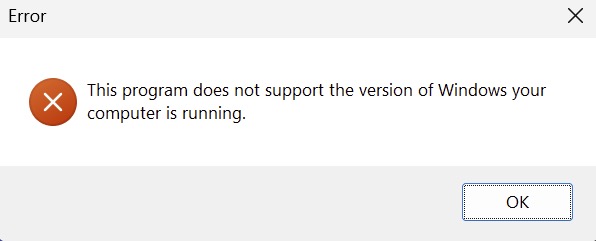
I’ve tried downloading/installing the update manually, but when I run it, I get a “your version of Windows is not supported” error.

Anyone else experiencing this? Suggestions? Thanks very much.

For what it’s worth, I use ST on both macOS and Windows, and the installation worked just fine on the macOS side.

0 Likes

Unable to install Sublime Merge 2130 or later on ARM64
#2

Does installing Build 4200 work? You can download the installer further down on this page: https://www.sublimetext.com/download.

0 Likes

#3

I already have Build 4200 installed. I installed it when I got the MacBook several months ago. Now I’m trying to update to the latest version.

0 Likes

#4

I know, I asked because I’m trying to figure out if it’s an issue specific to Build 4213 or if it’s perhaps an issue with your windows install. Providing a screenshot of the error may also help.

0 Likes

#5

After some digging I’ve figured out the cause of this. A fix is in the works.

1 Like

#6

Amazing. Thanks so much for your efforts on this, Benjamin. Greatly appreciated. :+1:

0 Likes

#7

This has been fixed in the dev build 4214.

1 Like

#8

Thanks so much!

0 Likes

#9

Windows 11 Pro (ARM64) 25H2, Parallels Desktop Pro 27.0.2, macOS 27.0, M4 Mac Mini Pro c14g20 64GB ram.
Registered user of Sublime Text 4 (4200).

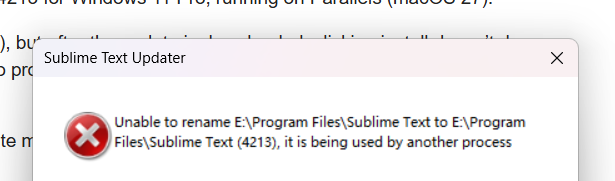
Have been running 4200 without issue on the above. Attempting to update to 4213 from a direct download of sublime_text_build_4213_x64_setup to Windows 11 Pro fails to install per the following dialog:

16%E2%80%AFPM

Also fails to update to 4213 from within 4200 stating unable to launch update installer.

Waiting for 4214… :sunglasses:

0 Likes

#10

Although a direct download and install of 4215 works on Windows 11 Pro (arm64), the application updater downloads the update, but clicking install from that application dialog fails to proceed with an unsupported dialog.

0 Likes

#11

I don’t see how that’s possible; the auto updater does not use the same installer, and it hasn’t changed since version 4200. I also deliberately tested that the auto-update mechanism works under UTM. Could you provide a screenshot of the error message?

0 Likes

#12

Both external and internal updates of 4215 work on Windows 11 Pro (arm64 & x86_64). If that contradicts my previous post, this one is correct.

0 Likes

#13

In my case, the updating from within ST still did not work (same issue: downloads just fine, but upon install, UAC sound chimes, but no visible dialogs or anything); however, downloading the 4215 installer worked perfectly. Thanks!

0 Likes

#14

Now, Can’t update 4213 to 4215 for Win 11 X64.

c706b2b3-7fde-4e98-8338-76e8df214319 .

The Resource Monitor show only updater .

image

0 Likes

#15

This post is specifically about arm64. See W11 - Impossible to install 4213

0 Likes

W11 - Impossible to install 4213