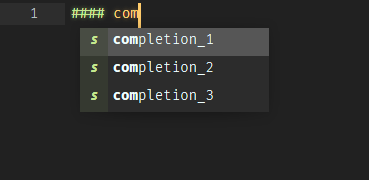
A plugin could do that. It would require an EventListener for on_query_completions which looks for the next section heading before the caret’s position. The resulting text would needto be used as key to lookup completion items.
The following snippet could be used to iterate through all ATX and SETEXT headings in a markdown file and search the nearest one. The pattern already has groups for hashtags (group 2) and the title text (group 3 and 4), which would need to be evaluated.
HEADINGS_RE = re.compile(
    r"""
    ^( [ \t]* )                                   # leading whitespace
    (?:
      ( \#{1,6} ) [ \t]+ ( [^\n]+ )               # ATX headings
    | ( [^-#\s][^|\n]* ) \n \1 ( -{3,} | ={3,} )  # SETEXT headings
    ) [ \t]*$                                     # maybe trailing whitespace
    """,
    re.X | re.M
)


def all_headings(view, start=0, end=None):
    text = view.substr(sublime.Region(start, end or view.size()))
    for m in HEADINGS_RE.finditer(text):
        title_begin = start + m.start()
        title_end = start + m.end()
        if m.group(2):
            # ATX headings use group 2 (heading) and 3 (leading hashes)
            level = m.end(2) - m.start(2)
        else:
            # SETEXT headings use group 4 (text) and 5 (underlines)
            level = 2 if text[m.start(5)] == "-" else 1
        # ignore front matter and raw code blocks
        if not view.match_selector(title_begin, "front-matter, markup.raw.block.markdown"):
            yield (title_begin, title_end, level)
    return None
The snippet is from MarkdownEditing.